
Go to documentation repository

Documentation for Axxon PSIM 2.0. Documentation for other versions of Axxon PSIM is available too.
Previous page Next page

Examples of addresses to view video from RTSP Server
To connect to the server and display video in the video player that supports the RTSP protocol, specify the address of the data source in the format given in the table:
Address | Example | Description |
|---|---|---|
rtsp://Server IP address[:Port]/CameraNo[?stream_id=StreamNo] | rtsp://127.0.0.1/1 | View the default stream from camera 1 if default port is used |
| rtsp://127.0.0.1:555/1 | View the default stream from camera 1 when broadcasting in the Multicast mode if default port 555 is used. Note. Connection to the RTSP stream is performed via the IP address of the broadcasting adapter, not by the destination IP address that is specified in the settings panel of the RTSP Server object and is used in internal logic | |
| rtsp://127.0.0.1:555/7?stream_id=7.2 | View second stream from camera 7 | |
rtsp://Server IP address[:Port]/CameraNo[?stream_id=StreamNo] | rtsp://127.0.0.1:554/7 | You can view video with audio only if you set the Play audio without request checkbox in the advanced settings of the RTSP server. The checkbox is set by default |
rtsp://Server IP address[:Port]/CameraNo?mic_id=off | rtsp://127.0.0.1:554/2?mic_id=off | View video from camera 2 without audio. Note. When mic_id=off, audio transmission is disabled regardless of other settings |
rtsp://Server IP address[:Port]/CameraNo?mic_id=auto | rtsp://127.0.0.1:554/2?mic_id=auto | View video from camera 2 with audio. Note. When mic_id=auto, the audio stream is selected automatically regardless of other settings |
| rtsp://Login:Password@Server IP address[:Port]/CameraNo | rtsp://login:pass@127.0.0.1:554/1 | View video from camera 1 if users and rights are configured in Axxon PSIM (see Rights administration) |
| rtsp://login:pass@127.0.0.1:555/1 | View video from camera 1 in the Multicast mode if users and rights are configured in Axxon PSIM | |
| rtsp://Server IP address[:Port]/CameraNo?mic_id=Microphone ID | rtsp://127.0.0.1:555/15?mic_id=1 | View video from camera 15 with audio |
| rtsp://Server IP address[:Port]/?mic_id=Microphone ID | rtsp://127.0.0.1:555/?mic_id=1 | Get audio only from microphone 1 with no video from any camera |
rtsp://Server IP address[:Port]/archive?id=CameraNo&time_begin=yyyy.mm.dd-hh:mm:ss&time_end=yyyy.mm.dd-hh:mm:ss | rtsp://127.0.0.1:554/archive?id=1&time_begin=2011.11.11-11:11:11&time_end=2011.11.11-11:12:00 | View the video archive of camera 1 for the specified time period. time_begin and time_end in the request are the local time of the computer on which the archive was recorded |
| rtsp://Server IP address[:Port]/archive?id=CameraNo&mic_id=Microphone ID&time_begin=yyyy.mm.dd-hh:mm:ss&time_end=yyyy.mm.dd-hh:mm:ss | rtsp://127.0.0.1:554/archive?id=1&mic_id=1&time_begin=2011.11.11-11:11:11&time_end=2011.11.11-11:12:00 | View video archive of camera 1 with audio from microphone 1 for a specified time period |
| rtsp://Server IP address[:Port]/archive?id=CameraNo&time_begin=yyyymmddThhmmssZ&time_end=yyyymmddThhmmssZ | rtsp://127.0.0.1:555/archive?id=1&time_begin=20160331T080000Z&time_end=20160331T080800Z | View video archive of camera 1 for the specified time period |
| rtsp://Server IP address[:Port]/archive?id=CameraNo&time_begin=yyyymmddThhmmssZ | rtsp://127.0.0.1:555/archive?id=4&time_begin=20160316T065000Z | View video archive of camera 4 from a specific start time till the archive end (as the value of time_end is not specified in the address) |
| rtsp://Server IP address[:Port]/archive?id=CameraNo | rtsp://127.0.0.1:555/archive?id=4 | View video archive of camera 4 from the beginning till the end |
| rtsp://Server IP address[:Port]/archive?id=CameraNo&long_term_archive=BackupArchiveNo | rtsp://127.0.0.1:559/archive?id=1&long_term_archive=2 | View video archive of camera 1 from Backup archive 2 |
| rtsp://Server IP address[:Port]/archive?id=CameraNo&gate=VideogateNo | rtsp://127.0.0.1:559/archive?id=1&gate=3 | View video archive of camera 1 from Videogate 3 archive |
| rtsp://Server IP address[:Port]/archive?id=CameraNo&time_begin=yyyymmddThhmmssZ&time_end=yyyymmddThhmmssZ&z=-1 | rtsp://127.0.0.1:554/archive?id=2&time_begin=20171120T102000Z&time_end=20171120T104000Z&z=-1 | View video archive of camera 2 for the specified time period in reverse order Note You can adjust the speed of forward and reverse playback directly in the player that you use. |
| rtsp://Server IP address[:Port]/archive?id=CameraNo&scale=speed | rtsp://127.0.0.1/archive?id=1&scale=4 | View video archive of camera 1 in fast playback |
| rtsp://Server IP address[:Port]/archive?id=CameraNo&time_begin=yyyymmddThhmmssZ&time_end=yyyymmddThhmmssZ&long_term_archive=BackupArchNo | rtsp://127.0.0.1:554/archive?id=2&time_begin=20241122T110200Z&time_end=20241122T114900Z&long_term_archive=1 | Get camera 2 recordings from Backup archive 1, starting from 11:02:00 on 11/22/2024 and ending at 11:49:00 on the same day. time_begin and time_end in the request are UTC+0 time. If the time zone of the archive is different, specify the time, taking into account the time difference. For example, if the archive is located in UTC+4 and you need a period from 15:02:00 to 15:49:00, the above example is suitable |
rtsp://Server IP address[:Port]/archiveaviexport?id=3
| rtsp://1:1@127.0.0.1:554/archiveaviexport?id=3 rtsp://1:1@127.0.0.1:554/archiveaviexport? id=1&time_begin=20250804T073000Z rtsp://1:1@127.0.0.1:554/archiveaviexport? id=1&time_begin=20250804T073000Z&time_end=20250804T080000Z | Receive the RTSP archive through AviExport when ArchViaAviExportAvailable=1 (see Registry keys reference guide). time_begin and time_end in the request are UTC+0 time. If the time zone of the archive is different, specify the time, taking into account the time difference. For example, if the archive is located in UTC+4 and you need a period from 15:02:00 to 15:49:00, the above example is suitable |
Note
If you use port 554 (default value), you don't need to specify it in the address line.
In the examples given above, specify the IP address of the computer hosting the RTSP Server object instead of 127.0.0.1.
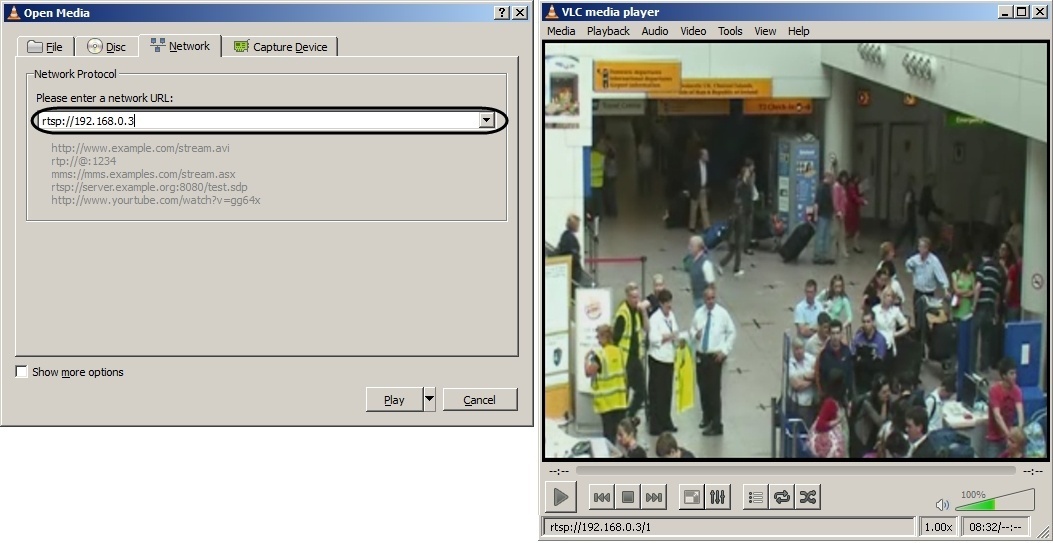
The figure shows how to view video from the server.
Overview
Content Tools