Unable to render embedded object: File (books.jpg) not found.
Go to documentation repository

Page History
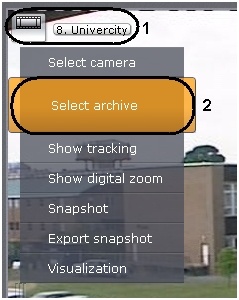
You can select an archive for display in a viewing tile by using the tile's context menu.
To select an archive, you must perform the following steps:
- Bring up the context menu in the viewing tile (1).
- Select Archive selection (2).
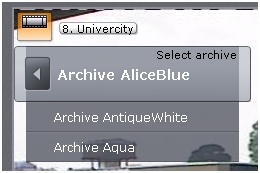
- Select the desired archive in the displayed list.
| Info | ||
|---|---|---|
| ||
| The selected archive is displayed in bold in the list. |
The selected archive will now be displayed in the viewing tile.
| Info | ||
|---|---|---|
| ||
| If there is no recording in the selected archive, a message to that effect will appear in the viewing tile. |
Overview
Content Tools