
Go to documentation repository


Page History
The functions of the internal variable determine the actions to be taken when the corresponding logical condition is fulfilled. Up to 6 IV functions can be set, while an IV function can start other IV function.
The IV functions are configured as follows:
- Go to the Apollo Internal Variable object settings panel.
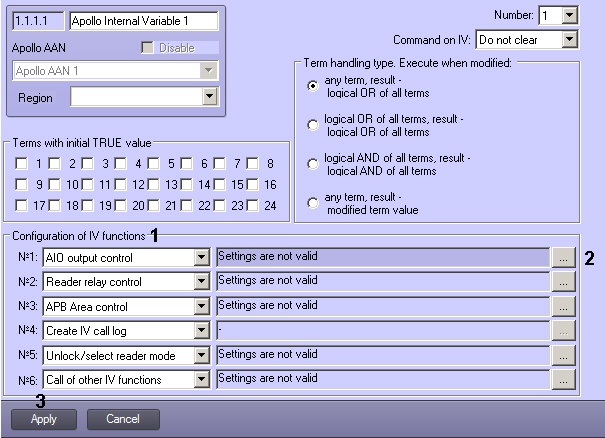
- Select the required function in the corresponding drop-down list (1, see table).
Click ... and configure the function parameters (2, see table).
Function
Description
Parameters
AIO output control
Switch relay on AIO security panel
Security panel
Panel relay
Reader relay control
Switch relay of a reader connected to an AIM controller
AIM controller
Reader
RelayAPB Area control
Change APB area state
APB Area
Create IV call log
Logging a message about the fulfillment of conditions of an the internal variable
-
Unlock/select reader mode
Setting operation mode of a reader connected to an AIM controller
AIM controller
Reader type
ModeCall of other IV functions
Performing functions of another internal variable, regardless of the meaning of its terms
Variable
- Click Apply (3).
- To save the changes to the controller, Write configuration to hardware.
...
Overview
Content Tools