
Go to documentation repository


Page History
You can configure the recognition settings of a Hikvision reader via the Hikvision K1T605XF Reader object configuration panel, which is created on the basis of the Hikvision K1T605XF object manually or automatically after reading the configuration from the corresponding controller (see Network settings of the Hikvision controller and Configuring the Hikvision controller).
To configure the Hikvision reader recognition settings, do the following:
- Go to the Hikvision K1T605XF Reader object setup panel.
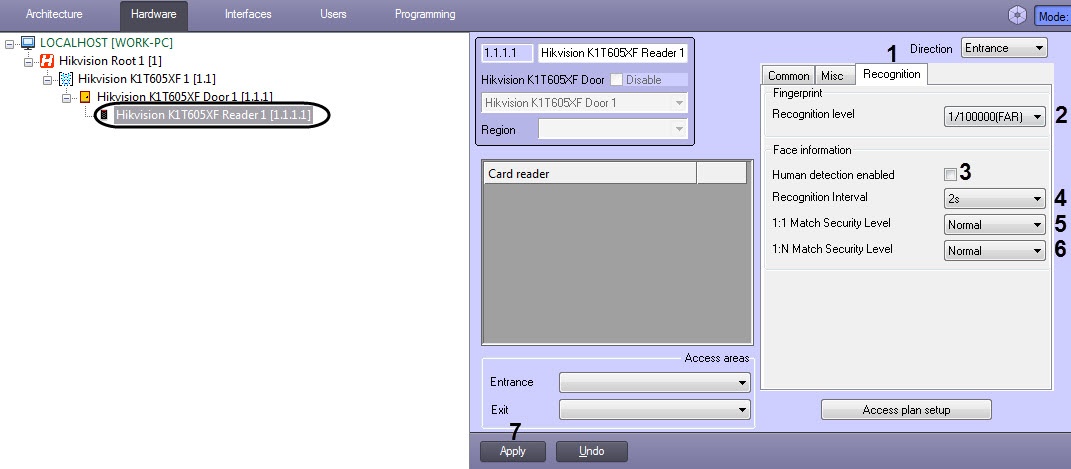
- Go to the Recognition tab (1).
- From the Recognition level drop-down list (2), select the recognition level:
- 1/1000(FAR).
- 1/100000(FAR).
- 1/1000000(FAR).
- 3/100000(FAR).
3/1000000(FAR).
Info title Note The higher the recognition level, the lower the probability of false identification.
- Set the Human detection enabled checkbox (3) to enable the detection of live faces.
- From the Recognition Interval drop-down list (4), select the time interval in seconds between the previous and next face recognition during the continuous operation: from 1s to 10s.
- From the 1:1 Match Security Level drop-down list (5), select the verification quality level if only one type of authentication is used: Normal, High, or Higher.
- From the 1:N Match Security Level drop-down list (6), select the authentication quality level if several authentication types are used: Normal, High, or Higher.
- Click the Apply button (7).
The Hikvision reader recognition settings are now configured.
Overview
Content Tools