
Go to documentation repository


Page History
On each Server's startupWhen you start Servers and Clients , Axxon Next automatically checks the digital signature for all executable files (exe, dll, so) for matching the digital signature.
If all files are located in place and match their signatures, an the "System integrity check passed successfully" event record appears in the system log (see The System Log).
Otherwise, an "System integrity check passed failed" event is registeredyou can set the system to automatically perform one of the pre-configured actions. To select a response, do as follows:
- Select Settings-> Options -> Security Policy (1-2).
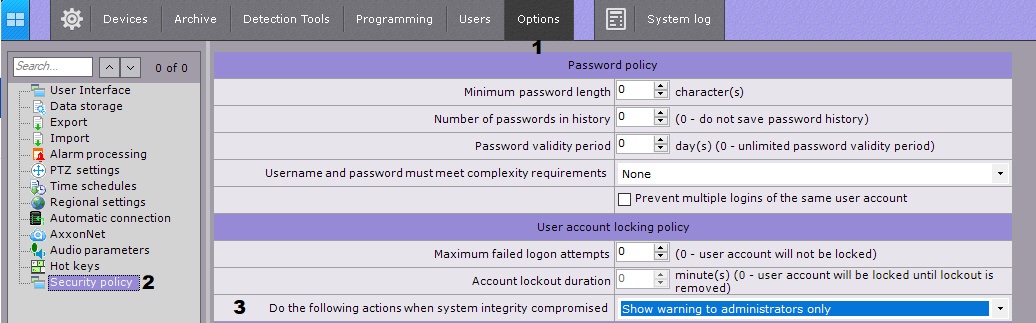
- From the Do the following actions when system integrity compromised (3) choose the necessary response:
Show warning to administrators only - if selected, when the Client starts , an alert will be displayed for users of the admin.
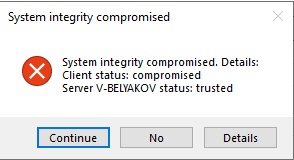
Info title Note To continue downloading the Client, click Yes , to close - No.
- Show warning to all users - in this case, all users will be alerted.
- Block users without admin rights - allows only users in the Admin role to access the Server.
- Stop non-vital services - shuts down all system objects that are subject to licensing (video cameras, detection tools, etc.).
- Click Apply.
Overview
Content Tools