
Go to documentation repository


Page History
Podczas konfiguracji narzędzia detekcji Wałęsania się, musisz ustalić maksymalny czas, przez który obiekt może pozostać w analizowanym obszarze. Gdy czas ten zostanie przekroczony, narzędzie detekcji zostanie wyzwolone.
Aby ustawić maksymalny czas, podejmij następujące działania:
- W drzewie narzędzi detekcji, wybierz obiekt typu Wałęsanie się
When configuring the Loitering detection tool, you must set the maximum time an object can be in the analyzed area: when the maximum time is exceeded, the detection tool is triggered.
To set a maximum time, you must perform the following steps:
- In the Detection Tools list, highlight a Loitering in area object (1).
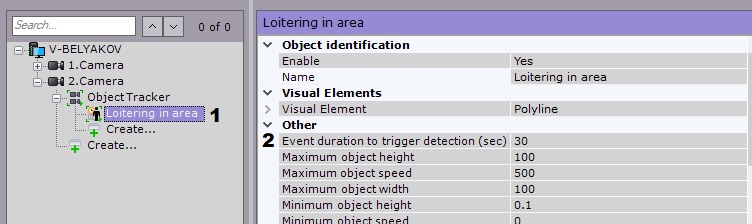
- In the W polu Event duration to trigger detection (sec) field (2), enter the maximum object loitering time in seconds. This value should be in the range wpis maksymalny czas wałęsania się w sekundach. Wartość powinna znajdować się w zasięgu [0, 3600].
- Click the Apply button.
- Naciśnij Zastosuj.
Konfiguracja maksymalnego czasu wałęsania się jest ukończonaThe maximum loitering time is now set.
Overview
Content Tools