
Go to documentation repository


Page History
System typu failover automatycznie zapobiega utracie danych w przypadku awarii jednego z serwerów.
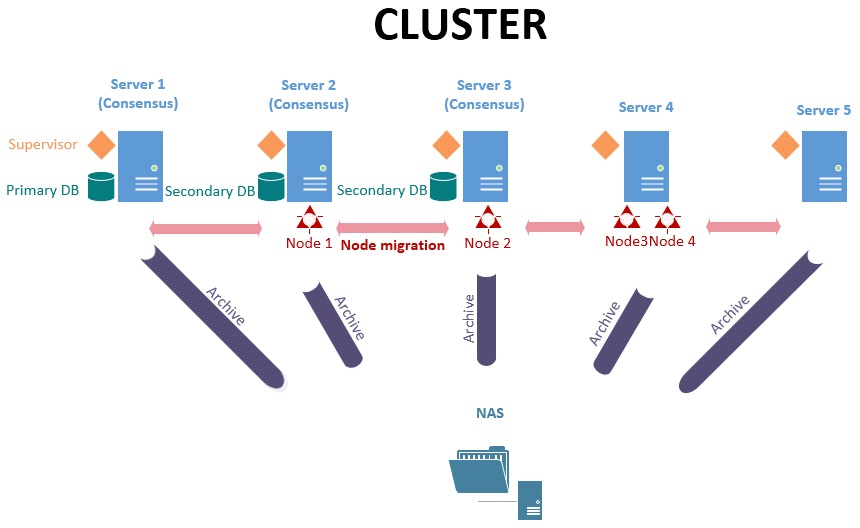
W systemie failower serwery są połączone w strukturę logiczną - klaster.
System Failover Axxon Next posiada dwa typy konfiguracji:
Typowa konfiguracja pozwala administratorom systemu na wytyczenie Serwerów w obrębie systemu, na których mogą być uruchamiane węzły Axxon Next
A failover system automatically prevents data loss when one of the servers in the system fails.
In a failover system, the servers are combined into a logical structure - the cluster.
The Axxon Next Failover system has two types of configuration.
The basic configuration allows system supervisors to permit launching Axxon Next servers (nodes) on any Servers within the system.
Info title Note While selecting a Server to transfer a node to, the supervisor tries to keep in balance the whole cluster's performance. If all Servers deliver more or less the same performance, the selection is performed randomly.
If Servers significantly differ in their performance, the supervisor may launch several nodes on a more capable Server, and no nodes on a less capable one.
- In the configuration with the specified backup Server, a node from the primary Server can be migrated only to the backup Server. After the primary Server is back online, the node is returned.
Podczas wybierania Serwera w celu przeniesienia węzła, usługa Supervisor zwraca uwagę na obciążenie poszczególnych Serwerów w klastrze. Jeśli wszystkie Serwery są obciążone w mniej więcej takim samym stopniu, Serwer jest wybierany losowo.
Jeśli Serwery znacząco różnią się wydajnością, usługa Supervisor może uruchomić wiele węzłów na bardziej wydajnych Serwerach, nie przekazując żadnych węzłów do Serwerów o ograniczonej mocy obliczeniowej.
- W konfiguracji z wytyczonym Serwerem backup, węzły mogą być przekazywane wyłącznie do Serwera backup. Węzły są przekazywane na powrót do ich pierwotnych Serwerów po ich powrocie do normalnej pracy.
Przekazywanie węzłów jest automatyczne, i nie trwa dłużej niż minutęNode migration is automatic and takes no more than one minute.
| Info | ||
|---|---|---|
| ||
In a system counting 100 cameras, the node is transferred in less than one minute in both Failover System configuration types. All Servers within the system have identical specificationsW systemie 100 kamer węzeł był przekazywany w mniej niż minutę w obu trybach konfiguracji Failover. Wszystkie Serwery w systemie posiadały identyczne specyfikacje: Intel i5-7400 3GHz 4-core CPU, 16Gb RAM. |
This section contains the following termsTa sekcja zawiera następujące terminy:
- Server -a computer with Failover Server and Client configuration of Axxon Next installed.
- Node- an instance of the Server services. A Server can have multiple nodes running.
- Cluster- logical grouping of Servers that allows migration of clusters between them. A cluster may encompass nodes from different Axxon domains.
- Supervisor- the service that monitors the status of nodes and their migration.
To implement Failover in your system, we strongly recommend that:
- The system administrator should have full control over all communication channels and hardware that provides fault tolerance at all times.
- You should build a cluster from servers in the same LAN.
- Use only the network archives, that are available from all servers in the cluster.
- Serwer - komputer z zainstalowanym Serwerem i Klientem w trybie Failover
- Węzeł - instancja usług Serwera. Na jednym Serwerze może działać wiele węzłów jednocześnie.
- Klaster - logiczna grupa Serwerów pozwalająca na przenoszenie węzłów między nimi. Klaster może zawierać węzły z różnych Domen Axxon.
- Supervisor- usługa monitorująca status węzłów oraz ich przenoszenie.
Przy implementacji Failover w twoim systemie, zalecane jest spełnienie następujących wytycznych:
- Administrator systemu powinien posiadać pełną kontrolę nad kanałami komunikacyjnymi oraz sprzętem zapewniającym redundancję.
- Klaster serwerów powinien w całości znajdować się w pojedynczej sieci lokalnej.
- Korzystaj wyłącznie z takich archiwów sieciowych, które są dostępne dla wszystkich serwerów w klastrze.
PrzykładExample:
Overview
Content Tools