
Go to documentation repository


Page History
Konfiguracja z Serwerem backup może zawierać dwa lub więcej Serwerów.
Aby utworzyć taką konfigurację, wykonaj następujące kroki:
- Najedź kursorem myszy na
 , a następnie naciśnij N+1.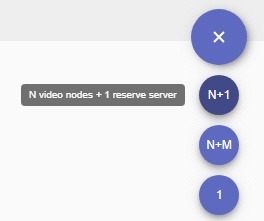
- Naciśnij
 i wyznacz Serwer backup.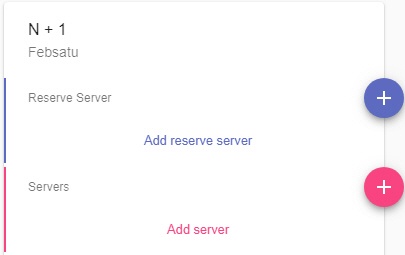
- Naciśnij
 w celu dodania Serwerów nadrzędnych.
 - Jeśli niezbędne są lokalne bazy zdarzeń na Serwerach, zaznacz odpowiednią opcję
A configuration with the backup Server can include two or more Servers.
To set up the configuration, do the following:
- Hover the mouse cursor over the button and click the N+1 button.
- Click and assign a backup Server.
- Click and add primary Servers.
- If you need to maintain a local event database on Servers, activate the corresponding switch (1).
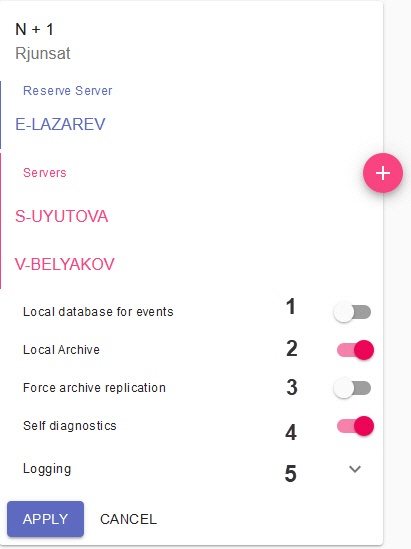
If you need to maintain local footage archives on primary Servers, activate the corresponding switch Jeśli niezbędne są archiwa lokalne na Serwerach nadrzędnych, aktywuj odpowiedną opcję (2).
Note title Attention! The local video footag will be created as a 10 GB file located in the Lokalne archiwum wideo będzie utworzone jako plik o wielkości 10 GB, zlokalizowany w folderze C:/temp_arch folder. If the node is migrated from a primary Server to a backup one, video data will be recorded to this file and replicated to the main Archive (video footage) on the backup Server (see paragraph 10).
- If you need to replicate local archives to the backup Server on permanent basis, activate the corresponding switch (3). Otherwise, the replication will be performed only when the corresponding node is migrated to the backup server.
By default, the self-diagnostics service is running on all nodes (see Usługa autodiagnostyki). To stop it, de-activate the Self-diagnostics parameter (4).
. Jeśli węzeł zostanie przeniesiony z Serwera nadrzędnego do Serwera backup, nagrania wideo będą zapisywane do tego pliku, a następnie replikowane do głównego Archiwum Serwera backup (patrz: punkt 10).
- Jeśli niezbędna jest regularna replikacja archiwów lokalnych do Serwera backup, aktywuj odpowiednią opcję (3). W innym przypadku, replikacja danych będzie przeprowadzana tylko wtedy, gdy węzeł jest przenoszony do Serwera backup.
Domyślnie usługa autodiagnostyki jest uruchomiona na wszystkich węzłach (zobacz: Usługa autodiagnostyki). Aby ją zatrzymać, odznacz parametr Self-diagnostics (4).
- Naciśnij przycisk Logging w celu konfiguracji ustawień logowania (5, zobacz: Click the Logging button to set the logging options (5, see Ustawianie podstawowej konfiguracji).
- Click the Naciśnij Apply button.
The configuration is now created, and the nodes are now automatically started. "Failover" string will be automatically added to the name of the backup node.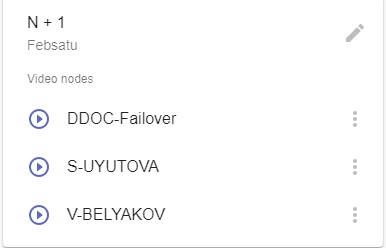
- Merge all nodes into a single Axxon domain (see Connecting to a Node and Configuring of an Axxon domain).
- Configure the footage archives operation:
- On the backup node, create an archive for replication (see Tworzenie archiwów).
- On the primary nodes, configure the replication from the primary Servers' archives to the backup node's archive. The replication period should be set to Always (see Konfiguracja replikacji danych). You have to set the replication time period to Always regardless of the value of the Forced Replication parameter (see paragraph 6).
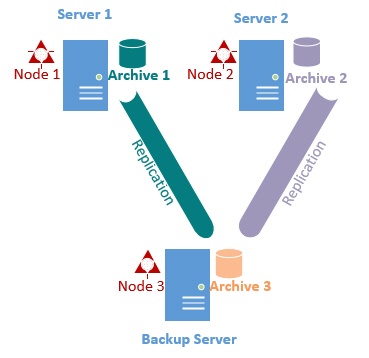
Configuration of the Failover system is now complete.
- .
Konfiguracja została utworzona; węzły będą automatycznie uruchamiane. "Failover" będzie automatyczne dodawane do nazwy każdego Serwera backup. - Połącz wszystkie węzły w jedną Domenę Axxon (zobacz: Nawiązywanie połączenie z Węzłem oraz Konfigurowanie Domeny Axxon).
- Skonfiguruj funkcjonowanie archiwów:
- Stwórz archiwum replikacji na Serwerze backup (zobacz: Tworzenie archiwów).
- Skonfiguruj replikację archiwów Serwerów nadrzędnych do archiwum Serwera backup. Okres replikacji powinien być ustawiony na Zawsze (zobacz: Konfiguracja replikacji danych), niezależnie od wartości parametru Forced Replication (patrz: punkt 6).
Konfiguracja systemu Failover jest zakończona.
Gdy węzeł jest przenoszony do Serwera Failover, zostaje utworzone tymczasowe archiwum o rozmiarze 10 GB w folderze "C:\temp_arch"; Axxon Next wyświetla je jako When a node is migrated to the Failover Server, the latter creates a temporary 10 GB archive in C:\temp_arch which Axxon Next refers to as Archive in Failover Server.
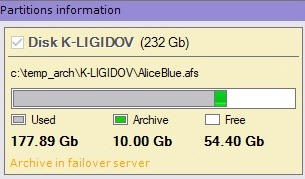
Its records will be replicated to Backup Server's main archive (see Archive 3 on the picture above) .
If necessary, you can further edit the configuration. To do so, click  . You can perform the following actions:
- add / remove Servers;
- add / delete nodes;
activate / de-activate the self-diagnostics service;
- change logging parameters;
- completely remove the configuration.
Nagrania w tym archiwum zostaną zreplikowane do głównego Archiwum Serwera Backup (patrz: Archive 3 na obrazku powyżej).
Jeśli jest to konieczne, możesz w dalszym stopniu modyfikować konfigurację. Aby to uczynić, naciśnij . Istnieje możliwość przeprowadzenia następujących akcji:
- dodawanie / usuwanie Serwerów;
- dodawanie / usuwanie węzłów;
aktywacja / deaktywacja usługi autodiagnostyki;
- zmiana parametrów logowania;
- całkowite usunięcie konfiguracji.
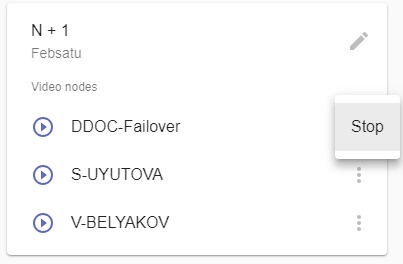
Aby ręcznie wyłączyć lub uruchomić węzeł, naciśnij  i wybierz pożądaną akcjęTo manually stop or launch a node, click and select the required action.
Overview
Content Tools