
Go to documentation repository


Page History
...
If the camera does not support multistreaming, then the video stream of lower quality will be disabled.
| Info | ||
|---|---|---|
| ||
In some cases (for example, if you do not have video from a camera), you may need to synchronize the time between the server and the camera when you connect them via ONVIF. |
| Note | ||
|---|---|---|
| ||
If you connect cameras via ONVIF, auto focus (AF) and auto aperture are not available |
Connection through ONVIF Generic driver
With the ONVIF Generic driver, you have the following options:
- Currently offline cameras can transfer their settings when they get back online.
To make it happen, follow the steps below:- Add a camera via the ONVIF Generic driver (see Generische Treiber (Allgemeines Gerät, generisch)).
- When the device comes online, reset its parameters (see Applying and resetting settings).
- Load the configuration from the device (see Applying and resetting settings).
- You can select another camera in object settings while keeping all layouts, macros and archive storage parameters.
To make it happen, follow the steps below:- Add a camera via the ONVIF Generic driver (see Generische Treiber (Allgemeines Gerät, generisch)).
- Set archive storage parameters and create macros.
- In Camera object settings, specify a new IP address and user credentials (see The Video Camera Object).
- Reset device settings (see Applying and resetting settings).
- Load the configuration from the device (see Applying and resetting settings).
This operation will result in swapping cameras without the need to create a new object and remove the old one.
Resolution
Axxon Next offers three resolutions for video from cameras connected via ONVIF: maximum, medium, and minimum.
...
| Camera type / Resolution | Maximum | Medium | Minimum |
|---|---|---|---|
| Non-megapixel | Maximum camera resolution | Average camera resolution | Minimum camera resolution |
| Megapixel | Maximum camera resolution | Camera resolution closest to 1024x768 | Camera resolution closest to 640x480 |
IP devices on other subnets (behind a NAT)
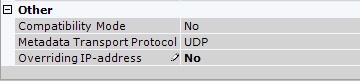
By default, NAT-friendly mode is enabled for cameras connected via the ONVIF driver.
To disable NAT-friendly mode, in the settings of a camera, select the No value for Overriding IP address.
IP devices which partially support the ONVIF protocol
To connect IP devices which only partially support ONVIF functions to the Axxon Next software package, you must use an ONVIF driver with compatibility mode enabled.
...
Overview
Content Tools