
Go to documentation repository


Page History
In the Axxon Next software package, several types of detection tools process incoming data:
- Situation analysis Face detection tools.
Facial recognition tools.
Automatic number plate recognition tool.
- Service detection tools:
- Video analytics.
- Audio analytics.
- Detection tools embedded in a video camera.
- License plate recognition.
- Trackers.
- Pose detection.
- Equipment detection (PPE).
- Person-based privacy masking.
- Fire detection and smoke detection.
- Water level detection.
- Motion in area detection.
- Retail analytics:
- queue detection,
- visitors counter,
- neurocounter.
- Service detection:
- Audio detection,
- Tampering detection.
- Embedded detection (IVA).
Detection tools are configured using the Detection Tools tab interface (within the Settings tab). To configure detection tools, it is necessary to have the appropriate user rightsDetection setup takes place using the interface in the Detection Tools tab (under Settings). For detection setup you must have the appropriate permissions.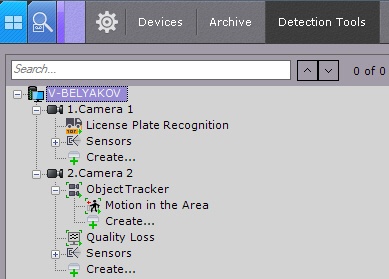
| Note | ||
|---|---|---|
| ||
For a video camera and its corresponding branch to appear in the Detection Tools list, the camera must be enabled in Axxon Next. |
| Info | ||
|---|---|---|
| ||
By default, camera inputs that can be activated through an automatic rule are displayed on the list of detection tools. |
...
Overview
Content Tools