
Go to documentation repository


Page History
...
- with the help of the Audio player interface object;
- with the help of the Voice Notification Service notification service system object.
The Audio player object is used to transmit audio signals from the selected microphones on to the supported IP devices.
...
- Go to the Audio player interface object settings panel.
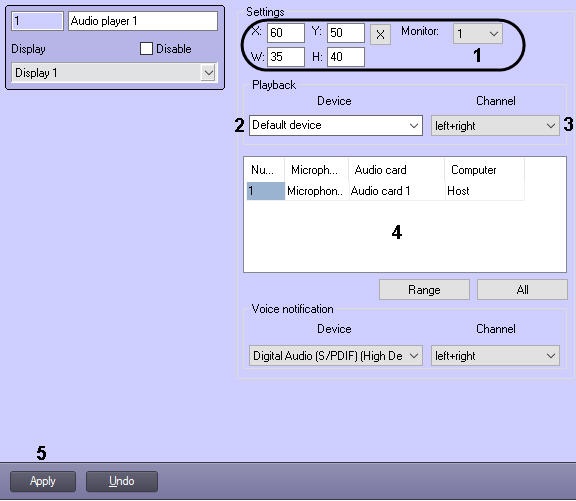
- Set the coordinates and the size of the Audio player interface window, as well as the number of the physical monitor on which the window will be displayed (1).
From the dropdown Device list, select the required IP device (2).
- From the dropdown Channel list, select the required audio signals playback channel (3).
- From the dropdown list in the Name Number column, select the Microphone object number, from which the audio signal has to be transmitted to the selected IP device (4). Other columns of the table will fill in automatically.
- Repeat step 5 for each required Microphone objects.
- Click the Apply button to save the changes (5).
...
| Info | ||
|---|---|---|
| ||
To enable audio signals transmission from the microphone to the IP device, click the  button (Interception from microphone) in the Audio player interface window. button (Interception from microphone) in the Audio player interface window. |
The Voice Notification Service notification service object is used to transmit audio files in the WAV format to the supported IP devices. Setting up of the Voice Notification Service notification service object is described in Setting up the voice notification.
| Info | ||
|---|---|---|
| ||
| When using Audio player and Voice Notification Servicenotification service together, note that the sampling rate of the audio signals transmitted from the microphones via the Audio player (the Sample rate setting of the Audio card object) and the sampling rate of the audio files transmitted with the help of the Voice Notification Service notification service should be the same. |
Overview
Content Tools