
Go to documentation repository


Page History
It is possible for the Client to automatically connect to Servers on different Axxon domains—클라이언트가 다른 Axxon 도메인의 서버에 자동으로 연결할 수 있습니다—크로스-시스템 클라이언트.
For this to take place, the following conditions must be true:
- Professional or Universe license has been activated on each Server to which the Client is connected;
- connection to all Servers made via with the same user name/password combination on each Axxon domain;
Server names and IP addresses are unique.
Configuration of automatic connection to Servers on different Axxon domains is performed as follows:
이 작업이 수행되려면 다음 조건이 충족되어야 합니다.
- 클라이언트가 연결된 각 서버에서 Professional 또는 Universe 라이센스가 활성화되었습니다.
- 각 Axxon 도메인에서 동일한 사용자 이름/비밀번호 조합을 통해 모든 서버에 연결됩니다.
서버 이름과 IP 주소는 고유합니다.
다른 Axxon 도메인의 서버에 대한 자동 연결 구성은 다음과 같이 수행됩니다.
설정(Settings) → 옵션(Options) → 자동 연결(Automatic connection)로 이동합니다 Go to Settings → Options → Automatic connection (1-2).
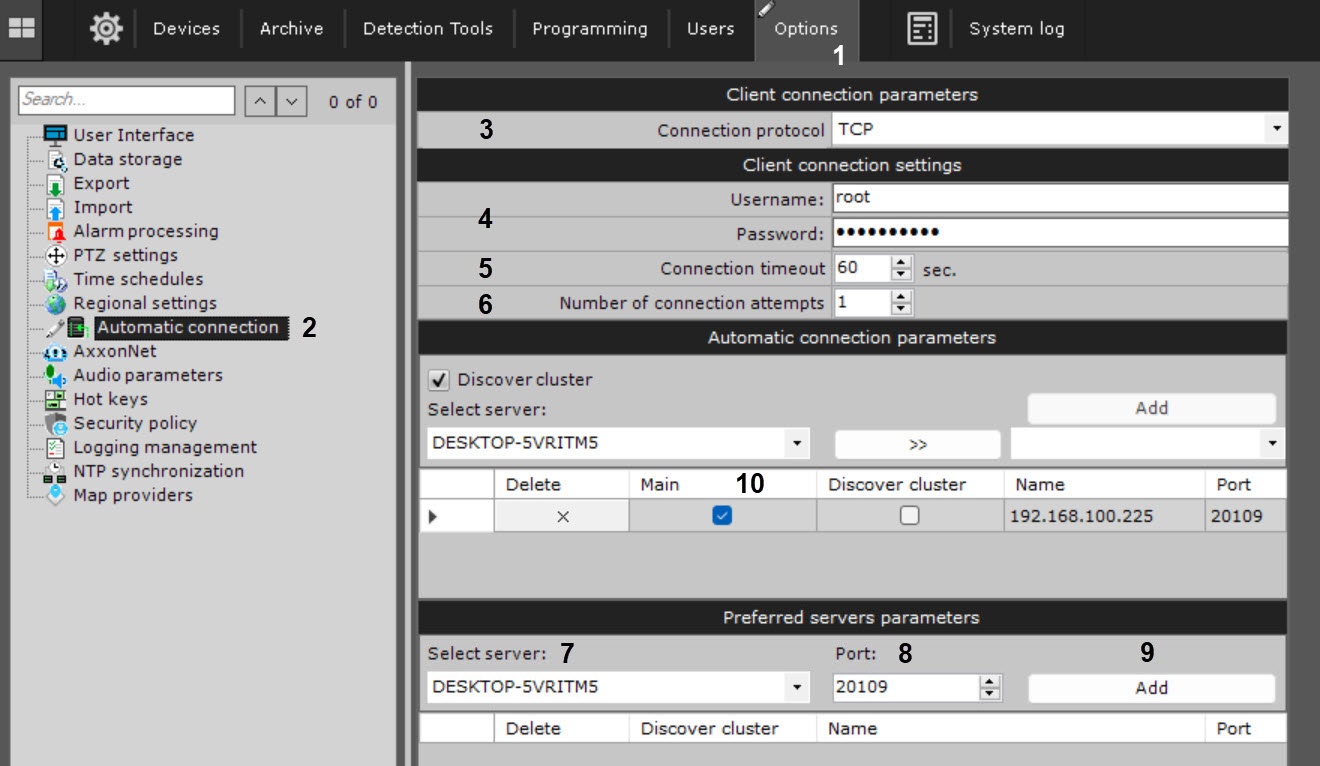
Configuring the protocol used by Clients to connect to the Server allows prioritizing reliability or speed of data transmission (3). The connection protocol is set individually for each Server in an Axxon-domain. All Clients connected to the Server will receive video streams over the selected protocol.
Descriptions and recommendations for selecting a protocol are given in the table.
Protocol Description TCP This protocol is more reliable but bandwidth-intensive. Recommended for Servers with small numbers of cameras UDP unicast UDP is typically faster but less reliable for data transmission. Unicast involves data transmission to a single recipient.
This protocol is best for Servers with many cameras connected to a single Client.
UDP multicast Multicast refers to data transmission to a group of recipients. This protocol is designed for Servers with many cameras connected to multiple Clients.
Important! This protocol has to be supported by all network components, in particular, switches.
클라이언트가 서버에 연결하는 데 사용하는 프로토콜을 구성하면 데이터 전송의 안정성이나 속도를 우선시할 수 있습니다(3). 연결 프로토콜은 Axxon 도메인의 각 서버에 대해 개별적으로 설정됩니다. 서버에 연결된 모든 클라이언트는 선택한 프로토콜을 통해 비디오 스트림을 수신합니다.
프로토콜 선택에 대한 설명과 권장 사항이 표에 나와 있습니다.
프로토콜 설명 TCP 이 프로토콜은 더 안정적이지만 대역폭을 많이 사용합니다. 카메라 수가 적은 서버에 권장됩니다. UDP 유니캐스트 UDP는 일반적으로 속도가 빠르지만 데이터 전송 안정성이 떨어집니다. 유니캐스트에는 단일 수신자에 대한 데이터 전송이 포함됩니다.
이 프로토콜은 단일 클라이언트에 연결된 많은 카메라가 있는 서버에 가장 적합합니다.
UDP 멀티캐스트 멀티캐스트는 수신자 그룹에 대한 데이터 전송을 의미합니다. 이 프로토콜은 여러 클라이언트에 연결된 많은 카메라가 있는 서버용으로 설계되었습니다.
중요! 이 프로토콜은 모든 네트워크 구성 요소, 특히 스위치에서 지원되어야 합니다.
- 각 Axxon 도메인에 로그인하는 데 필요한 사용자 이름과 비밀번호를 입력합니다 Type the user name and password needed for logging in to each Axxon domain (4).
Specify the Connection timeout parameter (5), which determines how long one must wait for a successful connection before considering the attempt to be unsuccessful. The default timeout value is 60 seconds, the maximum value is 5 minutes. When using this setting, automatic connection will attempt to connect immediately. If the connection fails, the Server will wait for a user-specified period of time (timeout) and retry the connection.
- Specify the maximum number of automatic connection attempts after the specified timeout (6).
- Indicate the Servers to connect to. For each Server, perform the following steps:
- select the Server in the list (7);
indicate the port for connecting to the Server (8).
Info title Note If the Port field is left blank, the standard port (20111) will be used for connecting.
Click the Add button (9).
Info title Note It is possible to connect to only one Server on an Axxon domain. So when a Server is added to the list, all other Servers on the Axxon domain become unavailable for selection.
Info title Note To remove a Server from the list, click the
 button.
- After all Servers have been added to the list, select the main Axxon domain.
When connecting, the Client will use the parameters (maps, layouts, user rights) of the main Axxon domain.
To select a main Axxon domain, select the check box in the relevant column of a Server that is on the Axxon domain (10). - Click the Apply button.
...
Overview
Content Tools