
Go to documentation repository


Page History
조이스틱을 구성하려면 다음과 같이 하십시오.
- 조이스틱을 컴퓨터에 연결합니다.
- 조이스틱을 교정하십시오.
- 목록에서 조이스틱을 선택하고
 버튼을 클릭하세요.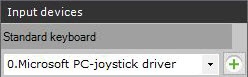
- 키보드 단축키를 설정하고 적용을 클릭합니다.
- PTZ 제어의 감도를 구성합니다.
- 텍스트 프로세서(예: 메모장)를 시작하고
To configure the joystick, do as follows:
- Connect the joystick to a computer.
- Calibrate the joystick.
- Select the joystick from the list and click the button .
- Set keyboard shortcuts, and click Apply.
- Configure the sensitivity for PTZ controls:
- Start a text processor (i.e. Notepad) and open the file <Joystick_Name>.xml, which is located in C:\Users\<User_Name>\AppData\Local\AxxonSoft\Axxon One\HotKeysXmlConfigurationFilesHotKeysXmlConfigurationFiles에 있는 <Joystick_Name>.xml 파일을 엽니다.
Set the sensitivity for commands in <Sensitivity>0.2</Sensitivity> 에서 명령의 민감도를 설정합니다.
No Format <HotKeysSchemaDeviceCommands> <CommandName>DiscreteZoomOut</CommandName> <HotKey>A2-</HotKey> <Sensitivity>0.2</Sensitivity> </HotKeysSchemaDeviceCommands>
The sensitivity values range from 민감도 값의 범위는 0.0(low sensitivity낮은 민감도) to 부터 1.0(high sensitivity높은 민감도). Please see the commands that have sensitivity settings in the table.까지입니다. 표에서 민감도 설정이 있는 명령을 참조하세요.
커맨드
커맨드 설
Command
DiscreteMoveXAxisRight Pan right (
오른쪽으로 이동)
DiscreteMoveXAxisLeft Pan left (
왼쪽으로 이동)
DiscreteMoveYAxisUp Tilt up (
위로 이동)
DiscreteMoveYAxisDown Tilt down (
아래로 이동)
DiscreteZoomIn Zoom in
DiscreteZoomOut Zoom out
DiscreteFocusNear Reduce the focal length초점 거리 줄이기
DiscreteFocusFar Increase the focal length초점 거리 늘리기
DiscreteIrisOpen Open the iris조리개 열기
DiscreteIrisClose Close the iris조리개 닫기
Note title Attention! Do not set values outside the range and edit other parameters in the file.
- Save the changes to the file.
Joystick configuration is now complete.
If the joystick is already configured and the specified file does not have the Sensitivity parameter, do as follows:
범위 밖의 값을 설정하거나 파일의 다른 매개변수를 편집하지 마십시오.
- 파일에 대한 변경 사항을 저장합니다.
이제 조이스틱 구성이 완료되었습니다.
조이스틱이 이미 구성되어 있고 지정된 파일에 민감도 매개변수 가 없는 경우 다음을 수행하십시오.
- Axxon One VMS에서 조이스틱을 제거/삭제합니다.
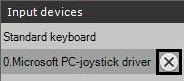
- 적용 버튼을 클릭하세요.
- 조이스틱을 다시 추가하고 구성하십시오
- Remove/Delete the joystick from the Axxon One VMS.
- Click the Apply button.
- Add and configure the joystick again.
Overview
Content Tools