
Go to documentation repository


Page History
기본적으로 서버 시간은 OS 시간과 동기화됩니다. NTP 서버와 서버 시간을 동기화하는 것이 가능합니다. 이를 위해서는 다음 조건이 충족되어야 합니다.
- Axxon One은 Windows OS에 설치됩니다.
- ndows OS에서는 자동으로 시간대 설정 옵션이 활성화됩니다. 이를 활성화하려면 Windows 10에서 설정 → 시간 및 언어로 이동하세요.
NTP 동기화를 구성하려면 다음을 수행하십시오.
By default, the server time is synchronized with the OS time. It is possible to synchronize the server time with the NTP Server. For this, the following conditions should be met:
- Axxon One is installed in Windows OS.
- In Windows OS, the Set time zone automatically option is enabled. To enable it, in Windows 10, go to Settings → Time & Language.
To configure NTP synchronization, do the following:
- Select Settings → Options (1) → NTP synchronizer.
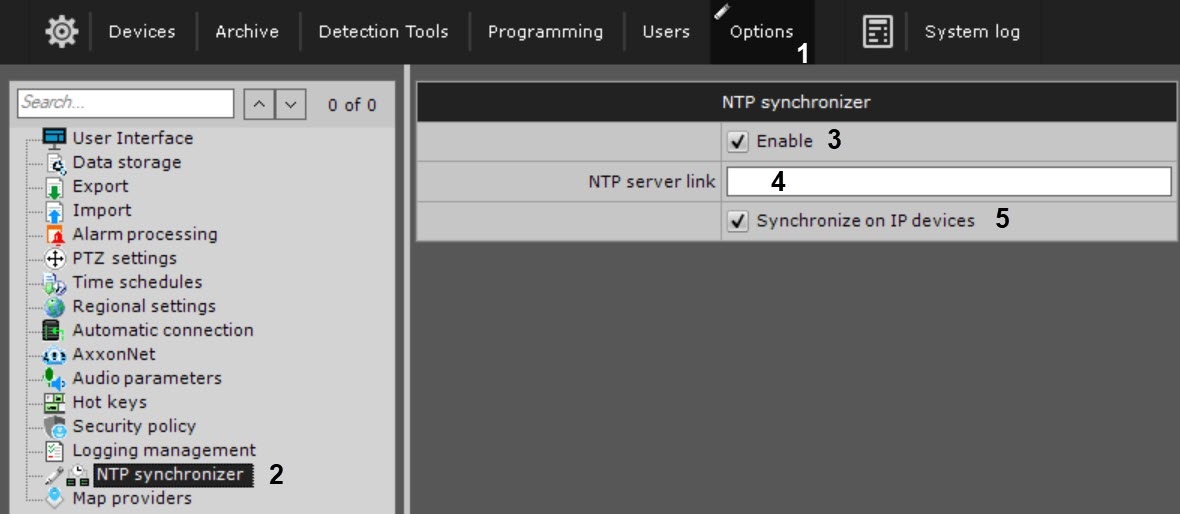 Set the Enable checkbox
 - NTP 동기화 장치를 활성화하려면 활성화 확인란 (3) to enable NTP synchronizer.
- In the NTP server link field (4), specify the address of the required NTP Server.
- 을 설정하세요
- NTP 서버 링크 필드(4)에 필요한 NTP 서버의 주소를 지정합니다.
서버에 연결된 IP 장치에 대한 시간 동기화를 활성화하려면 IP 장치 동기화 확인란을 설정하세요 (5)Set the Synchronize on IP devices checkbox (5) to enable time synchronization for the IP devices connected to the Server.
Info title Note NTP time synchronization on IP devices works only for devices that support this feature.
- Click the Apply button.
IP 장치의 NTP 시간 동기화는 이 기능을 지원하는 장치에서만 작동합니다.
- 적용 버튼을 클릭하세요.
NTP 동기화는 24시간마다 한 번씩, 설정이 변경되면 자동으로 수행됩니다NTP synchronization will be performed automatically once every 24 hours, and when the settings are changed.
Overview
Content Tools