
Go to documentation repository


Page History
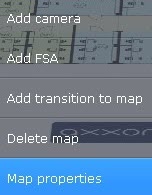
이전에 생성된 맵의 종류와 표시를 변경할 수 있습니다.맵 상황에 맞는 메뉴를 열고맵 속성을 선택하세요.
맵 생성 창과 유사한 맵 속성 구성 창이 열립니다 (새로운 맵 추가 참고
You can change the type and display of a map that has been created previously. To do so, open the map context menu and select Map properties.
A map properties configuration window opens, which is similar to the map creation window (see 새로운 맵 추가).
Overview
Content Tools