
Go to documentation repository


Page History
...
To proceed to a particular video, click the  button in the Video column. To return to a main page, click the BACK button.
Editing a bookmark
To edit a bookmark, do the following:
- Select the required bookmark in the table.
- Click the EDIT BOOKMARK button.
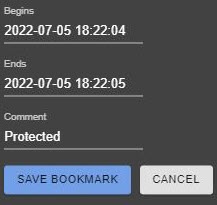
- If necessary, you can change the time interval and/or a text comment.
- Click the SAVE BOOKMARK button.
Deleting a bookmark
To delete a bookmark, select it in the table and click the DELETE BOOKMARK button.
You can delete several bookmarks. To do this, set the checkboxes next to the required bookmarks and click the DELETE BOOKMARK button.
Un-protecting a video
To un-protect a video, clear the Protected checkbox next the bookmark.
Deleting a protected video
To delete a protected video, select a protected bookmark and click the DELETE RECORD button.
Overview
Content Tools