
Go to documentation repository


Page History
In Axxon PSIM it is possible to , you can use scaling while displaying video signal displaying on the Video video surveillance monitor with the help of the GreenStream technology. This function allows choosing the optimal stream depending on the size of the video image, frame rate, and bit rate. For example, if many cameras are simultaneously displayed on the Video video surveillance monitor, it is not needed necessary to receive the video from them in high resolution. Increasing the When enlarging a video image, the video stream should must be requested in a higher resolution.
Video stream properties can be specified through the Axxon PSIM interface (see see Configuring the section Configuration of multistream video) or through a camera's web interface.
For automatic video stream selection to work, the Video stream setting check box checkbox must be selected set in the configuration settings panel of the Camera object (see Configuring the section Configuration of multistream video) and more than one video stream from the camera must be integrated (refer to the list of IP devices integrated with Axxon PSIM , on the on the Documentation Drivers Pack page).
If the function of video stream auto-select is enabled, Axxon PSIM selects selects the video stream the following way:
- The streams indicated on the Advanced settings tab of the Camera object are selected (all streams that are not disabled).
- From the streams chosen selected during the previous step, the streams that have a resolution greater than the resolution requested by the Client client are selected. If no such streams exist, the streams with the highest resolution are selected.
From the streams chosen selected during the previous step, the streams that have a frame rate higher than the frame rate requested by the Client client are selected. If no such streams exist, the streams with the highest frame rate are selected.
Info title Note The requested frame rate is specified during selection and configuration of cameras for the Monitor interface object , in the fps column on the List of cameras tab (see the section Selecting and configuring video Selection and configuration of cameras).
If multiple streams were selected during the previous steps, the stream among these that has the highest bitrate is selected.
...
If automatic stream selection is enabled, selection will be performed for the cameras for which the Default video stream has been selected.
Any stream can be forbidden You can disable the use of certain streams for display using the block_stream registry key (see Registry keys reference guide).
| Info | ||
|---|---|---|
| ||
When the layout of a viewing tile surveillance windows is changed in the Video Surveillance Monitorvideo surveillance monitor, the width of the viewing tile may surveillance window can change, causing another stream to be selected for display. |
To enable the function of auto select of automatic selection of video stream for displayingdisplay, do the following:
- Go to the settings panel of the Monitor interface object.
- Go to the List of cameras tab (1).
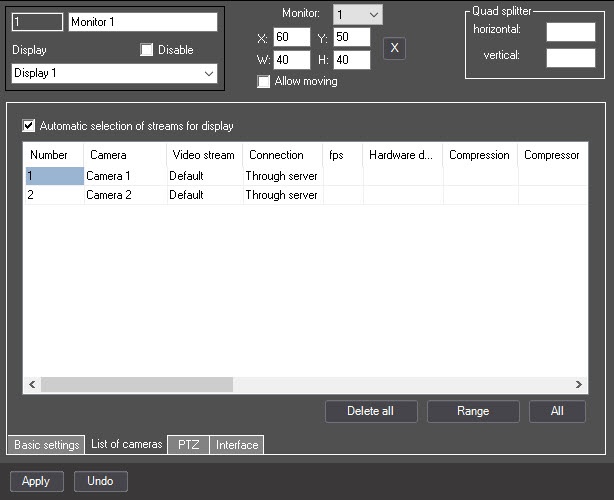
- Set the Automatic selection of streams for display checkbox (2) checkbox.
- Click the Apply button (3).
Configuring an auto select Configuration of the automatic selection of video stream for displaying display is completedcomplete.
Overview
Content Tools