
Go to documentation repository


Page History
...
Server error on Windows 11 OS and Windows Server 2019 OS
On Windows 11 OS and Windows Server 2019 OS errors may occur in the Server operation when Guardant drivers are installed. It is recommended not to install Guardant drivers. Installation of Guardant drivers is disabled by default.
For the correct installation of Guardant drivers, it is necessary to disable the check of the drivers digital signature in the operating system and disable Secure Boot in BIOS.
Guardant drivers compatibility issue
When you install Axxon One, a Guardant driver compatibility issue may occur (grdkey.sys or grdusb.sys file error).
To fix the error, do as follows:
- Disable Memory integrity:
- Open Windows Security Center → Device security.
- In the Core isolation section, click the Core isolation information link.
- Set the Memory integrity switch to the inactive position.
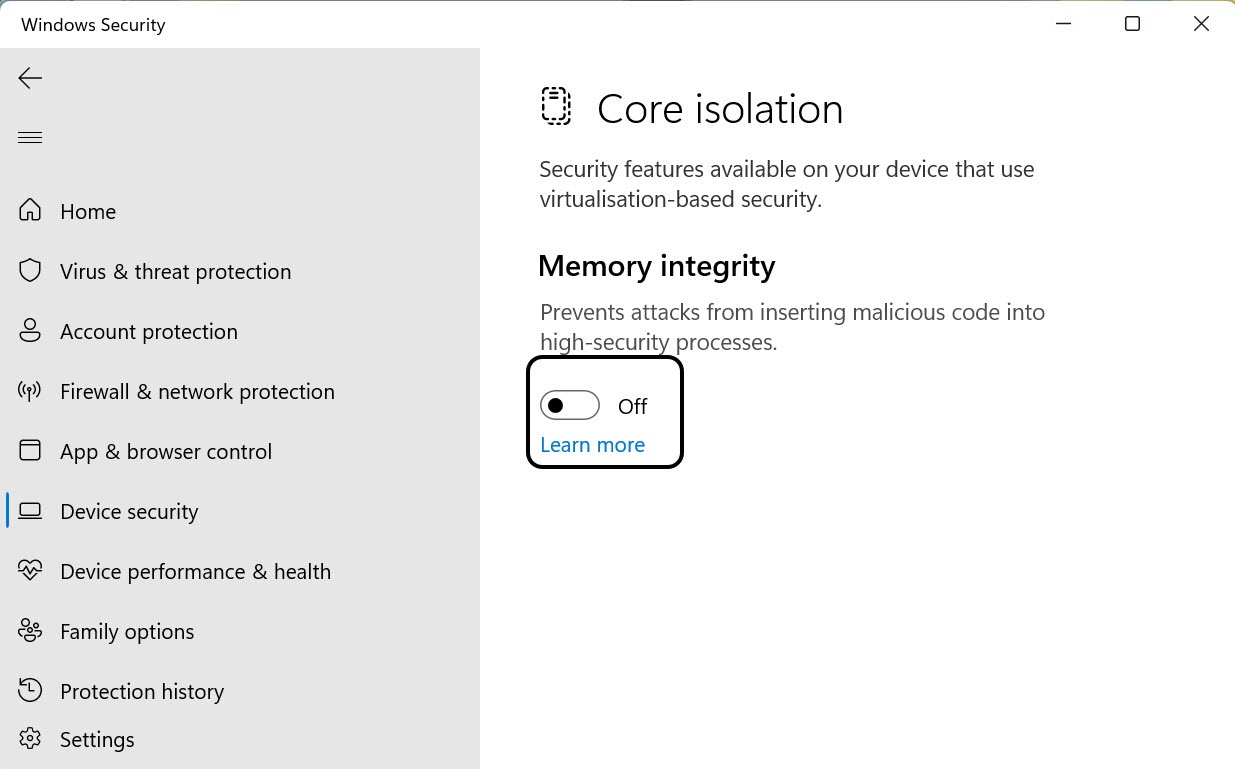
- After you complete these steps, restart your computer to apply the changes.
- Disable Device Guard:
- Using the command line, run the gpedit.msc command to launch the Local Group Policy Editor.
- Go to Computer Configuration → Administrative Templates → System → Device Guard → select Enable virtualization-based security on the right.
- After you disable these options, restart your computer and reinstall the current version of Guardant drivers.
| Note | ||
|---|---|---|
| ||
If you use modern Guardant keys (Sign/Sign Net/Time/Code), you can contact the developer of the protected application and request to switch the key to driverless mode (see the official Guardant documentation). In this case, it will not be necessary to install the Guardant Driver on your computer to work with the key. |
An error occurred when installing on Windows with the language pack Norsk (bokmål)
...
Overview
Content Tools