
Go to documentation repository


Page History
For proper replication operation the replication to operate correctly, you must create the following objects are to be created in the Target objects tree of the Target objects:
- In On the Hardware tab of the System settings dialog box window, create the Computer objects with the names corresponding to the Source names of Sources from which the archive records recordings are to be copied (1).
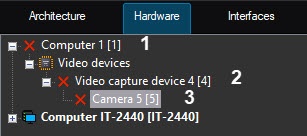
- Under On the basis of the created Computer object objects, create the the Video Capture Devicecapture device objects with the names that correspond to the same names numbers corresponding to them on Sources (2).
- Under On the basis of the created Video Capture Devicecapture device objects, create the Camera objects with the numbers corresponding to the camera numbers the archive records from which are to , which archive must be copied from Sources Sources (3).
| Info | ||
|---|---|---|
| ||
| The Camera and Video Capture Device objects will be disabled because capture device objects are marked in the objects tree as disabled since there is no connection between Source and Target. |
When replication is completed the After you complete the replication, an archive is available in from the interface of the Video surveillance monitor on by cameras that are in the query file.
Configuration of Configuring the Target objects tree is completedcomplete.
Overview
Content Tools