It is possible to install You can install, repair, update, and removeWEB Report System PSIM in silent in quiet mode.
To do thisstart installation, select one of the following options:
- In the setup.ini file
, - located in the directory with
the - theWEB Report System
PSIM distribution kit, specify the following- PSIM distribution package (see Installation), enter:
| Code Block |
|---|
CmdLine= /quiet |
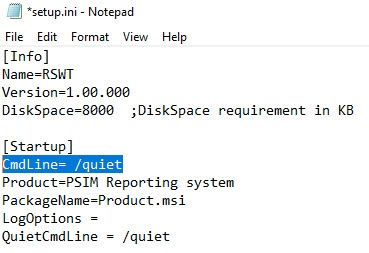 Image Modified
When you run the
setup Setup.exe
executable file, the installation ofWEB Report System PSIM
starts in
quiet mode
.
Go to the directory with the WEB Report System PSIM distribution kit, and enter the following command at the Windows command prompt:
| Code Block |
|---|
setup.exe /quiet |
Immediately after running this command, the WEB Report System PSIM installation in silent mode will beginWhen you are in the WEB Report System PSIM distribution directory, use the Windows command line to specify the parameters of the setup.exe file. The parameters of the setup file are listed in the table.
| Parameters of the setup.exe file in the command line | Description |
|---|
/x | Removal of WEB Report System PSIM |
/uninstall | Removal of WEB Report System PSIM |
/r | Repair of WEB Report System PSIM |
/repair | Repair of WEB Report System PSIM |
/qn | Installation/update of WEB Report System PSIM |
/quiet | Installation/update of WEB Report System PSIM |
/norestart | Disable automatic system restart during installation |
/debug | Logging |
/LANG=”en” | Select the English language for the installation program |
/CMD="[commands]" | Property values for the base installation program, where commands is [Property]="[Value]" or [Property]='[Value]'. The available properties of the installation program are listed in the table below |
When the setup.exe process completes in Windows Task Manager, the installation finishes as well.
| Info |
|---|
|
During installation of WEB Report System PSIM in quiet mode, the computer will restart. After the restart, the installation process continues automatically. |
Example of running the WEB Report System PSIM installation/update in quiet mode with the setup.exe file
setup.exe /quiet /norestart
This action launches the setup.exe file with the following parameters:
The program installs WEB Report System PSIM in quiet mode (/quiet).
Automatic system restart during installation/update is disabled (/norestart).
Example of running the WEB Report System PSIM repair in quiet mode with the setup.exe file
setup.exe /r /quiet /norestart
This action launches the setup.exe repair file with the following parameters:
The program repairs WEB Report System PSIM (/r).
The program repairs WEB Report System PSIM in quiet mode (/quiet).
Automatic system restart during repair is disabled (/norestart).
Example of running the WEB Report System PSIM uninstaller in quiet mode with the setup.exe file
setup.exe /x /uninstall /quiet /norestart
This action launches the setup.exe uninstaller with the following parameters:
The program uninstalls WEB Report System PSIM (/x /uninstall).
The program uninstalls WEB Report System PSIM in quiet mode (/quiet).
Automatic system restart during uninstallation is disabled (/norestart).
- You can use the Windows system utility Msiexec.exe to determine the parameters of the Product.msi installation file in the Windows command line.
| Note |
|---|
|
You must specify the parameters of the database connection. |
Example of running the WEB Report System PSIM installation/update in quiet mode with the Msiexec.exe utility
msiexec /i Product.msi /qn /norestart WT_CON_STRING="Provider=SQLOLEDB.1;Data Source=(local)\SQLEXPRESS2014;Integrated Security=SSPI;Initial Catalog=psim;DataTypeCompatibility=80"
POS_CON_STRING="Provider=SQLOLEDB.1;Data Source=(local)\SQLEXPRESS2014;Integrated Security=SSPI;Initial Catalog=posdb;DataTypeCompatibility=80"
AUTO_CON_STRING="Provider=SQLOLEDB.1;Data Source=(local)\SQLEXPRESS2014;Integrated Security=SSPI;Initial Catalog=ts;DataTypeCompatibility=80"
LPREX_CON_STRING="Provider=SQLOLEDB.1;Data Source=(local)\SQLEXPRESS2014;Integrated Security=SSPI;Initial Catalog=lprex;DataTypeCompatibility=80"
DT_CON_STRING="Provider=SQLOLEDB.1;Data Source=(local)\SQLEXPRESS2014;Integrated Security=SSPI;Initial Catalog=dt;DataTypeCompatibility=80"
DETECTPACK_CON_STRING="Provider=SQLOLEDB.1;Data Source=(local)\SQLEXPRESS2014;Integrated Security=SSPI;Initial Catalog=detectorpack;DataTypeCompatibility=80" SQL_AUTHTYPE="Windows" SQL_INSTANCE_CMD="(local)\SQLEXPRESS2014" /l*v "C:\Reporting system install.log"
This action launches the MSI installation file with the following parameters:
The program installs/updates WEB Report System PSIM (/i Product.msi).
The program installs/updates WEB Report System PSIM in quiet mode (/quiet).
Automatic system restart during installation/update is disabled (/norestart).
Example of running the WEB Report System PSIM uninstaller in quiet mode with the Msiexec.exe utility
msiexec /x Product.msi /qn /norestart WT_CON_STRING="Provider=SQLOLEDB.1;Data Source=(local)\SQLEXPRESS2014;Integrated Security=SSPI;Initial Catalog=psim;DataTypeCompatibility=80"
POS_CON_STRING="Provider=SQLOLEDB.1;Data Source=(local)\SQLEXPRESS2014;Integrated Security=SSPI;Initial Catalog=posdb;DataTypeCompatibility=80"
AUTO_CON_STRING="Provider=SQLOLEDB.1;Data Source=(local)\SQLEXPRESS2014;Integrated Security=SSPI;Initial Catalog=ts;DataTypeCompatibility=80"
LPREX_CON_STRING="Provider=SQLOLEDB.1;Data Source=(local)\SQLEXPRESS2014;Integrated Security=SSPI;Initial Catalog=lprex;DataTypeCompatibility=80"
DT_CON_STRING="Provider=SQLOLEDB.1;Data Source=(local)\SQLEXPRESS2014;Integrated Security=SSPI;Initial Catalog=dt;DataTypeCompatibility=80"
DETECTPACK_CON_STRING="Provider=SQLOLEDB.1;Data Source=(local)\SQLEXPRESS2014;Integrated Security=SSPI;Initial Catalog=detectorpack;DataTypeCompatibility=80" SQL_AUTHTYPE="Windows" SQL_INSTANCE_CMD="(local)\SQLEXPRESS2014" /l*v "C:\Reporting system install.log"
This action launches the MSI installation file with the following parameters:
The program uninstalls WEB Report System PSIM (/x Product.msi).
The program installs/updates WEB Report System PSIM in quiet mode (/qn).
Automatic system restart during uninstallation is disabled (/norestart).
Example of running the WEB Report System PSIM repair in quiet mode with the Msiexec.exe utility
msiexec /fvomus Product.msi /qn /norestart WT_CON_STRING="Provider=SQLOLEDB.1;Data Source=(local)\SQLEXPRESS2014;Integrated Security=SSPI;Initial Catalog=psim;DataTypeCompatibility=80"
POS_CON_STRING="Provider=SQLOLEDB.1;Data Source=(local)\SQLEXPRESS2014;Integrated Security=SSPI;Initial Catalog=posdb;DataTypeCompatibility=80"
AUTO_CON_STRING="Provider=SQLOLEDB.1;Data Source=(local)\SQLEXPRESS2014;Integrated Security=SSPI;Initial Catalog=ts;DataTypeCompatibility=80"
LPREX_CON_STRING="Provider=SQLOLEDB.1;Data Source=(local)\SQLEXPRESS2014;Integrated Security=SSPI;Initial Catalog=lprex;DataTypeCompatibility=80"
DT_CON_STRING="Provider=SQLOLEDB.1;Data Source=(local)\SQLEXPRESS2014;Integrated Security=SSPI;Initial Catalog=dt;DataTypeCompatibility=80"
DETECTPACK_CON_STRING="Provider=SQLOLEDB.1;Data Source=(local)\SQLEXPRESS2014;Integrated Security=SSPI;Initial Catalog=detectorpack;DataTypeCompatibility=80" SQL_AUTHTYPE="Windows" SQL_INSTANCE_CMD="(local)\SQLEXPRESS2014" /l*v "C:\Reporting system install.log"
This action launches the MSI installation file with the following parameters:
Automatic system restart during installation/update is disabled (/norestart).
The program repairs WEB Report System PSIM (/fvomus Product.msi):- Reinstalls the product (/f).
- Starts execution from the original package and caching of the local MSI database (v).
- Installs if an older version is installed (o).
Overwrites all necessary files (m).
- Overwrites all registry entries for the current user (u).
- Overwrites all registry entries for the local computer and runs all shortcuts (s).
Installation, repair, update, and removal of WEB Report System PSIM in quiet mode are complete.


