
Go to documentation repository


Page History
Starting with weekly build 1.0.1.172, the Debug 4 mode is enabled by default. In previous versions, the Debug debug window is disabled by default.
To enable the Debug debug window, do the following:
- Shut down Axxon PSIM.
Run the Advanced Tweaki.exe utility.
Info title Note You can enable the Debug window without using the tweaki.exe utility. For this, set values 1, 2, 3, or 4 for the Debug string parameter in the HKEY_LOCAL_MACHINE\SOFTWARE\AxxonSoft\PSIM section of the Windows registry (HKEY_LOCAL_MACHINE \Software\Wow6432Node\AxxonSoft\PSIM for a 64-bit system). - Select Axxon PSIM section in the tree on the left side of the utility dialog box.
- Change the value of the Debug mode parameter from Disabled to Debug 1, Debug 2, Debug 3, or Debug 4. Any of these modes will enable the Debug debug window, the difference between them is in the amount of information written to the log files (see The Settings panel of the Axxon PSIM section).
- Click the OK button.
- Start Axxon PSIM.
A new Debug window item will appear on the Main control panel of Axxon PSIM.
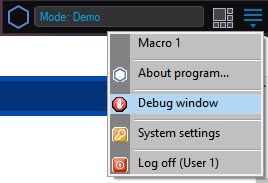
Info title Note This menu is also available in the Windows notification area (system tray)—left-click the the  button button or short-click the F8 hot key.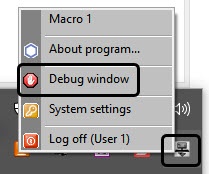
- Select the Debug window item on the Main main control panel in order to display the Debug debug window on the screen. The selected selected Debug window item is marked with a flagcheck mark.
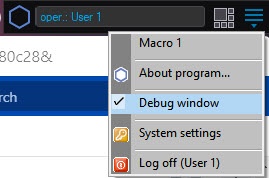
The debug window is enabled.
To hide the Debug debug window, re-select the Debug window item on the Main main control panel.
| Info | ||
|---|---|---|
| ||
| To disable the Debug debug window, select the Disable value for the Debug mode in the tweaki.exe utility or set 0 value 0 for the Debug string parameter in the HKEY_LOCAL_MACHINE\SOFTWARE\AxxonSoft\PSIM section of the Windows registry (HKEY_LOCAL_MACHINE \Software\Wow6432Node\AxxonSoft\PSIM for a 64-bit system). These actions are performed when you exited exit Axxon PSIM. |
Overview
Content Tools