Versions Compared

Key

  • This line was added.
  • This line was removed.
  • Formatting was changed.

...

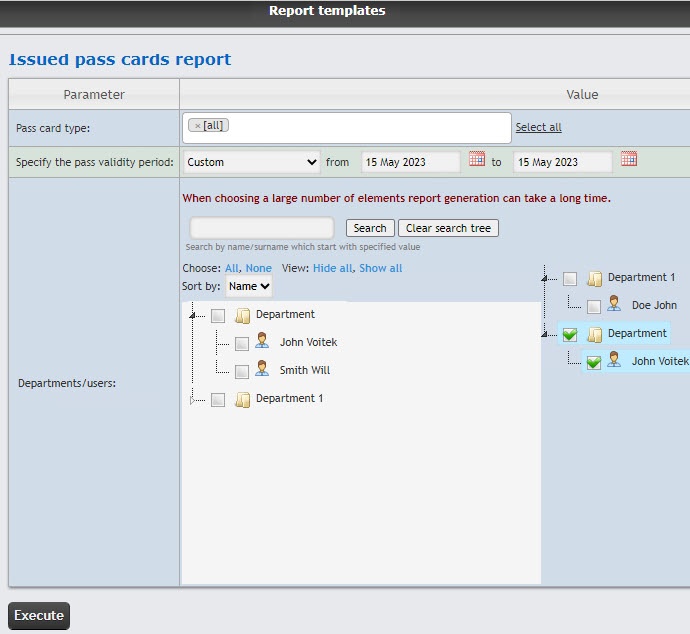
  1. Select the Issued pass cards report (see Selecting Select the type of Access Manager report). As a result the dialog box for specifying the report parameters will be displayed.
    Set the report parameters in the following way:
  2. From the Pass card type drop-down list, select the type of issued pass card.
  3. From

  4. the 
  5. the Specify the pass validity period drop-down list select the time period for which the report is to be created.

    Info
    titleNote
    • If the Custom period is selected, enter the date of start and end periods for which the report is to be created in the from and to fields using the Calendar tool. Click the Image Modified button near the corresponding field to use the Calendar tool.
    • The minimum period of time that can be set is one week.
  6. In the Departments/users field set checkboxes for the departments or employees, the information on which should be displayed in the report. Click All to select all found employees or departments, click None to deselect. Click Show all to expand the department structure, click Hide all to hide the structure. 
  7. You can find an employee by name or surname using the search. To do it, enter at least 4 first characters of the employee's first name or surname in the search
  8. field and
  9. field and click the Search button. The department to which the found employee belongs will be displayed in the additional object tree to the right. To clear the search field and the search tree, click the Clear search tree button.
  10. Be default, the list of departments and employees is sorted by name. To sort by number, select this option from the Sort by drop-down list.
  11. To create a report,

  12. click
  13. click Execute. As a result, the report with specified parameters is displayed.
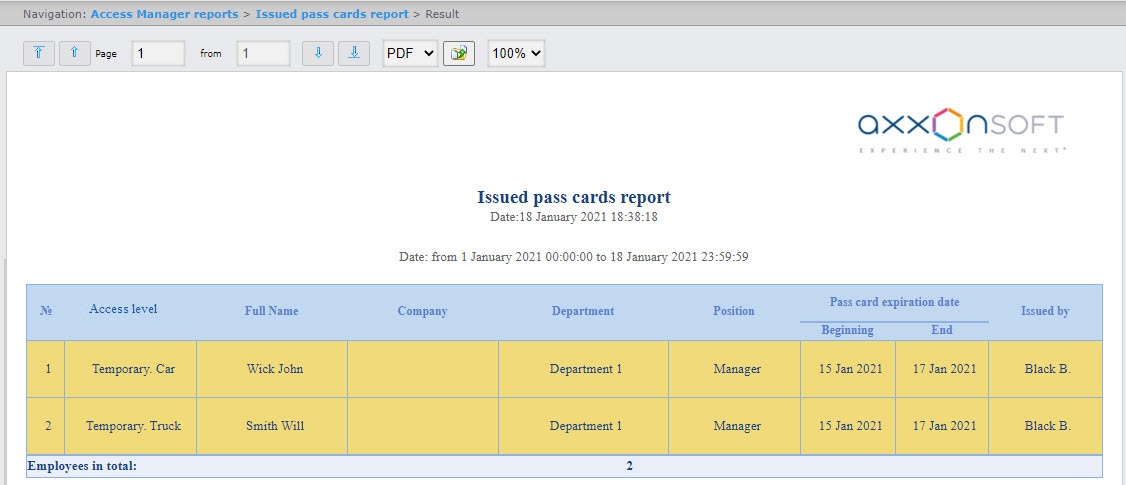
    Image Modified
    The report fields are described in the table.

    Field nameDescription
    Issued pass card typeType of pass card
    Date/Time of issueDate and time of pass card issue
    Period of validity (the number of days)Pass card validity period
    Issuing authority (individual)Full name fo employee
    Issuing authority (department)Department to which the employee belongs
    Issuing authority (access manager employee)Full name of employee who issued the pass card
    The Employees in total line indicates the number of issued pass cards of each type within current department