
Go to documentation repository
| Note | ||
|---|---|---|
| ||
If you want to use the computing resources of the NVIDIA GPU to improve license plate recognition, select the required option from the Use GPU drop-down list on the settings panel |
Configure IV module as follows:
...
of the LPR channel |
...
| title | Attention! |
|---|
object (see Selecting a device for license plate recognition). |
The startup (initialization) time of the algorithm of license plate recognition |
...
on the NVIDIA GPU can take |
...
approximately one minute. No |
...
license plate recognition events |
...
are received until |
...
initialization is complete. |
To set up the IV module:
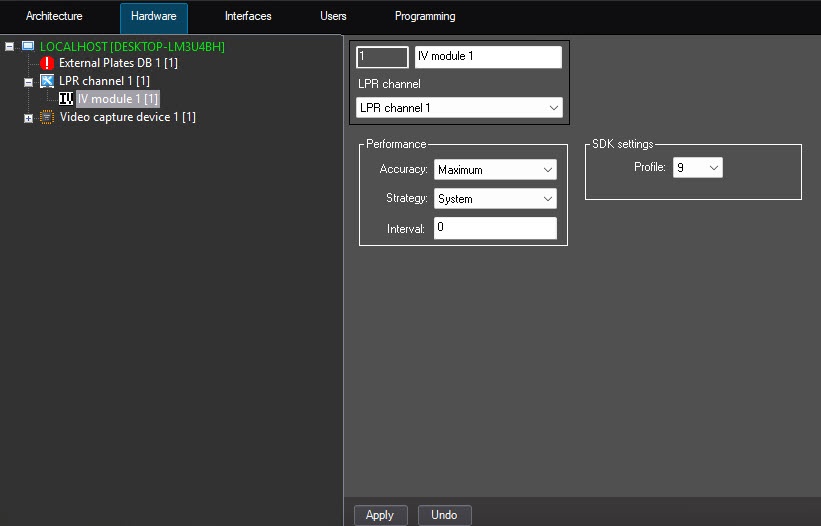
Select From the Profile drop-down list, select the profile of country license plates that are to must be recognized in the Profile drop-down list(6).
| Note | ||
|---|---|---|
| ||
The profile of country license plates should must match the selected country for license plate recognition (see Selecting the country and license plate recognition SDK). |
The following options are available:
3, 6, and 9—for more information, see The IV module functionality.
| Info | ||
|---|---|---|
| ||
The 9 profile enables recognizing correctlyprofile enables the correct recognition of the USA license plates with vertical letters on the plates. It can also be recommended to be in use when maximum recognition accuracy is needed if there is no high load on hardware. GreaterA higher profile number enables more accurate LPR comparinglicense plate recognition compared to the solution with smallera lower number, but it is more demanding toon computing resources. |
Configuration of the IV module is completedcomplete.

