
Go to documentation repository


Page History
...
Configure Forteza one-position sensor as follows:
- Go to the settings panle panel of the Forteza one-position sensor object.
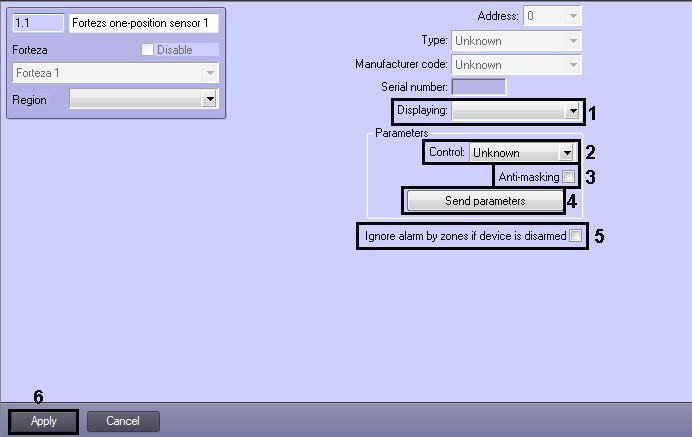
- From the Displaying drop-down list select set of icons corresponding to one-position sensor (1).
- From the Control drop-down list select the way of sensor control. It's possible to control sensor independently or using a compputer (2).
- If an alarm event is to be generated in the system when an attempt to cover sensor with reflecting layer is detected, set the Anti-masking checkbox checked (3).
- To send parameters to device click the Send parameters button (4).
- If it's required to ignore alarm events when device is disarmed, set the corresponding checkbox (5).
- Click the Apply button to save changes (6).
...
Overview
Content Tools