
Go to documentation repository


Page History
The MorphoAccess SIGMA Lite controller tampering (unauthorized access) protection is configured as follows:
- Go to the MorphoAccess SIGMA Lite object settings panel
Настройка режима защиты от несанкционированного доступа контроллера MorphoAccess SIGMA Lite осуществляется следующим образом:
- Перейти на панель настроек объекта MorphoAccess SIGMA Lite.
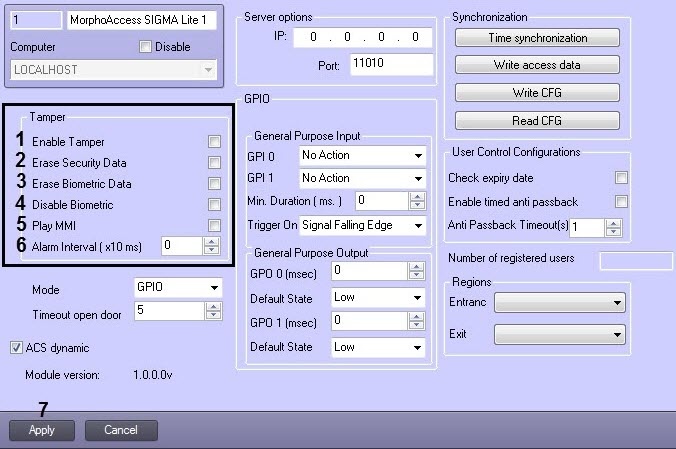
- Установить флажок Set the Enable Tamper checkbox (1), если необходимо активировать режим защиты от несанкционированного доступа. Если данный режим включен, то при физическом вмешательстве в корпус контроллера произойдет срабатывание тревоги и будут активированы параметры, установленные ниже.
- Установить флажок Erase Security Data (2), если при вмешательстве требуется удалить все пользовательские ключи, хранящиеся во всех бесконтактных картах и сбросить до значений по умолчанию.
- Установить флажок Erase Biometric Data (3), если при вмешательстве требуется удалить все пользовательские отпечатки пальцев и сбросить до значений по умолчанию.
- Установить флажок Disable Biometric (4), если при вмешательстве требуется отключить биометрическую аутентификацию пользователей.
- Установить флажок Play MMI (5), если при вмешательстве требуется воспроизвести звуковую сигнализацию.
- if it is necessary to enable the tampering (unauthorized access) protection. If it is enabled, then the alarm will be triggered and the parameters set below will be activated in case of physical intervention in the controller housing (tampering).
- Set the Erase Security Data checkbox (2), if it is necessary to delete all user access keys stored in all proximity cards and reset the controller to default values in case of tampering.
- Set the Erase Biometric Data checkbox (3), if it is necessary to delete all user fingerprints and reset the controller to default values in case of tampering.
- Set the Disable Biometric checkbox (4), if it is necessary to disable the biometric user authentication in case of tampering.
- Set the Play MMI checkbox (5), if it is necessary to activate the audible alarm in case of tampering.
- In the В поле Alarm Interval (x10 ms) field (6) ввести в миллисекундах интервал отправки тревожного события о несанкционированном доступе.
- Нажать на кнопку Apply (7) для применения изменений.
- enter the time interval in milliseconds for sending the alarm event about the unauthorized access.
- Click Apply (7) to apply the changes.
Configuring the MorphoAccess SIGMA Lite controller tampering (unauthorized access) protection is completeНастройка режима защиты от несанкционированного доступа контроллера MorphoAccess SIGMA Lite завершена.
Overview
Content Tools