
Go to documentation repository


Page History
...
- Go to the settings panel of the Virdi Door object, which is created on the basis of the Virdi ACU object.
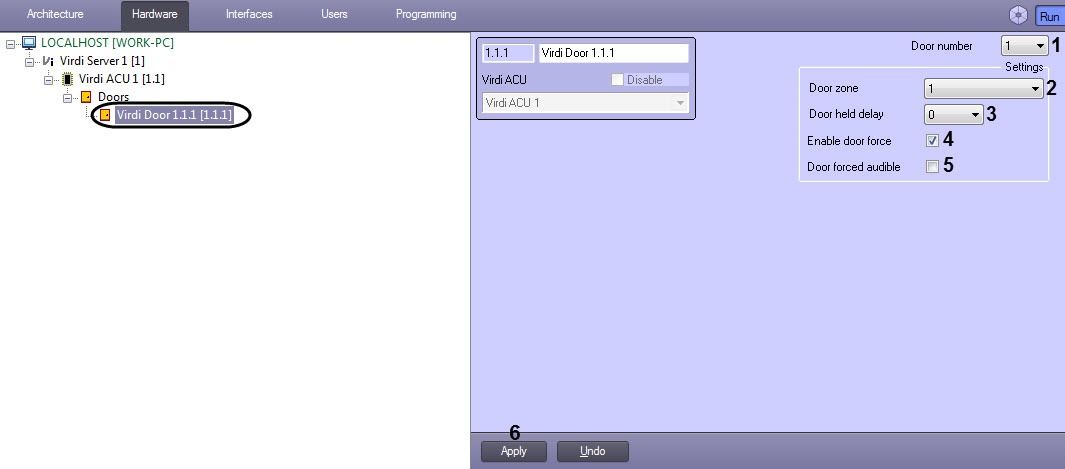
- From the Door number drop-down list (1), select the entry number from 1 to 4.
- From the Door zone drop-down list (2), select the zone to which this door should belong:
- *Unassigned* - zone is not assigned.
- from 1 to 8.
From the Door held delay drop-down list (3), select the time in seconds after which the open door will be considered as held: from 0 to 255.
Info title Notes - The total time until the door hold alarm is activated is considered as follows: Open time (see Configuring Setting up the Virdi readerReader) + Door held delay time.
- To receive this alarm, the type of zone to which this door belongs should be Exit1, Exit2, Instant, or Interior.
- Set the Enable door force check box (4) if it is necessary to monitor the holding of the door.
- Set the Door forced audible check box (5) if it is necessary to generate a visual and audible alarm on the reader of this door if the door is held.
- Click the Apply button (6) to apply the settings.
...
Overview
Content Tools