

Page History
지도에 카메라를 추가한 후 다음 작업을 수행합니다.
- 현장에서 카메라의 실제 위치를 나타내는 지도 상의 위치로 비디오 카메라 아이콘을 드래그합니다
After adding a camera to the map, perform the following actions:
- Drag the video camera's icon to the place on the map that represents the camera's actual location at the site (1).
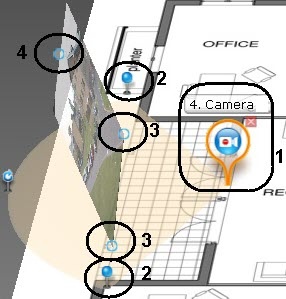
On the map, use the corner nodes to adjust the video camera's field of view to match the actual situation at the site 지도에서 모서리 노드를 사용하여 현장의 실제 상황과 일치하도록 비디오 카메라의 시야를 조정합니다 (2).
Note title Important! For ceiling-mounted fisheye cameras (see 천장 장착형 어안 카메라의 경우 (Configuring fisheye cameras 참고), you are advised to set a 360° field of view. If you do so, the video from the camera will be directly available in the specified area:
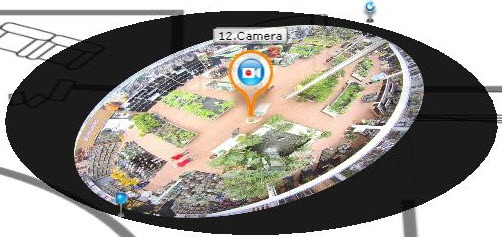
To enable this feature on cameras with ImmerVision lenses, PTZ display mode must be chosen (see Configuring fisheye cameras).
360° 시야각을 설정하는 것이 좋습니다. 그렇게 하면 카메라의 비디오를 지정된 영역에서 직접 사용할 수 있습니다.
ImmerVision 렌즈가 장착된 카메라에서 이 기능을 활성화하려면 PTZ 디스플레이 모드를 선택해야 합니다 (Configuring fisheye cameras 참고).
비디오 표시 영역을 구성합니다.Configure the area for video display:
Note title Important! The video display area is not available for ceiling-mounted fisheye cameras. 천장에 장착된 어안 카메라에는 비디오 표시 영역을 사용할 수 없습니다.
- 기준점을 사용하여(3) 영역의 크기를 설정합니다(왼쪽 버튼을 클릭하고 커서를 드래그).
세번째 점을 사용하(4) 영역의 기울기를 변경합니다
- Using the points at the base (3), set the size of the area (left-click and drag the cursor).
Using a third point (4) to change the tilt of the area.
Info title Note You can switch map display to flat while working with the Map (see 지도 작업 중에 지도 표시를 평면 표시로 전환할 수 있습니다 (Customizing an Interactive Map 참고).
- Using the slider in the lower-right corner to set the default transparency of the area.

- 오른쪽 하단 모서리에 있는 슬라이더를 사용하여 해당 영역의 기본 투명도를 설정합니다.
표준 지도 보기 모드에서 카메라 구성이 완료되었습니다Configuration of the camera in standard map viewing mode is complete.
Overview
Content Tools