


Page History
AxxonNet generates AxxonData generates reports based on events from Axxon One.
| Note | ||
|---|---|---|
|
To access the reports page, click the Reports link.

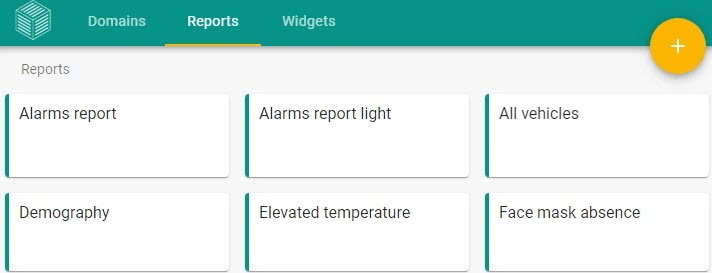
The following reports are available:
|
To access the reports, click the Reports tab. The following reports are available in AxxonData:
- Alarms reports:
- Alarms report (see Alarms report in AxxonData).
- Alarms report light (see Alarm reports without images in AxxonData).
- Demography (see Demographic report in AxxonData).
- Faces lists (see Face lists report in AxxonData).
- Face mask absence (see Report on people without masks in AxxonData).
- Visitors table (see Report
- Demographic report.
Reporting camera-based visitor counts.
- Visitors report.
- Queue length report.
- Face lists report.
- Interval report Report
- Export people count (see Interval report on the number of persons recognized in AxxonData).
Report on people without masks.
- LPR lists (see AxxonData LPR lists report)
- .
- All vehicles (see All vehicles report in AxxonData).
- Vehicles on parking (see Reporting about vehicles on a parking lot in AxxonData).
- Visitor count per day (by hour) (see Visitors report by hour in AxxonData).
- People total counter (see Reporting camera-based visitor counts in AxxonData).
- Visitors (see Visitors report in AxxonData).
- Presence or absence of equipment (see AxxonData PPE On/Off report).
- Total PPE violations (see Report on all violations of PPE regulations in AxxonData).
- Queue length (see Queue length report in AxxonData).
- Line crossing count (see Line crossing report in AxxonData).
- Social distance violations (see Report on the violation of the social distancing in AxxonData).
- Elevated temperature (see Report on fever-screening events in AxxonData).
Line crossing report.
- Alarms report.
- Alarms report light.
- Visitor count per day by hour.
In AxxonNet, you can also use the visitor counter widget.
| Note | ||
|---|---|---|
| ||
By default, a maximum of 500 events is displayed in the search results. You can increase the limit only in the local report subsystem. To increase the limit, please contact technical support. Attention! Increasing the limit can impact system performance and increase the time it takes to generate results. |
...
| title | Note |
|---|
...
Overview
Content Tools