
Go to documentation repository


Page History
기본적으로 클라이언트 로깅 수준은 특수 유틸리티에서 설정됩니다 (로그 관리 유틸리티 참고). 클라이언트를 종료하기 전에 클라이언트의 로깅 수준을 변경할 수 있습니다.
클라이언트의 로깅 수준을 변경하려면 다음을 수행하십시오.
- 설정 → 옵션 (1) → 로깅 관리 (2)를 선택합니다.
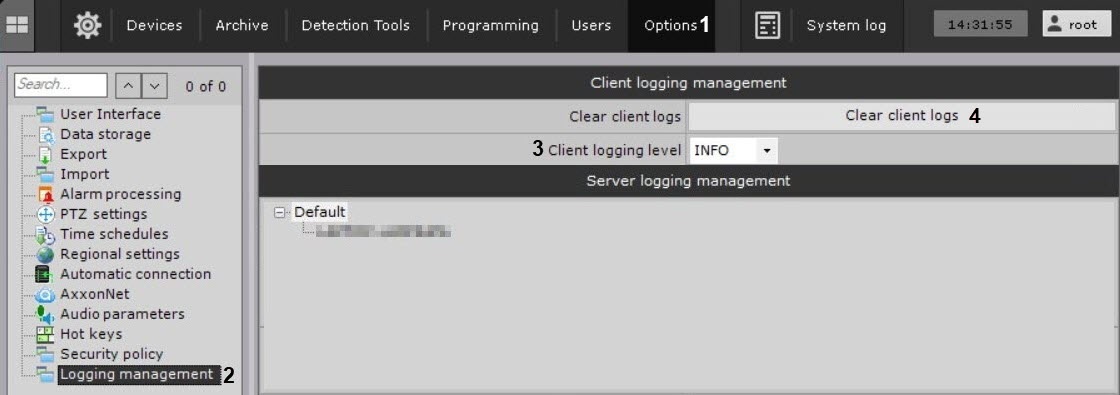
- 필요한 로깅 수준을 선택합니 (3). 수준은 로깅 수준 구성 페이지 에 설명되어 있습니다 .
- 적용 버튼을 클릭하세요 .
클라이언트 로깅 수준이 변경되었습니다. 다음에 클라이언트가 시작되면 로깅 수준은 로깅 관리 유틸리티의 새 설정에 해당합니다.
모든 클라이언트 로그를 삭제할 수도 있습니다. 이렇게 하려면 다음을 수행하십시오.
- 클라이언트 로그 지우기 버튼을 클릭합니다 (4).
- 적용 버튼을 클릭합니다
By default, the Client logging level is set in a special utility (see Log Management Utility). You can change the logging level of the Client before you exit it.
To change the logging level of the Client, do the following:
- Select Settings → Options (1) → Logging management (2).
- Select the required logging level (3). Levels are described on the Configuring Logging levels page.
- Click the Apply button.
Client logging level is changed. The next time the Client is started, the logging level will correspond to the new settings in the logging management utility.
You can also delete all Client logs. To do this, do the following:
- Clickthe Clear client logs button (4).Click the Apply button.
Overview
Content Tools