
Go to documentation repository


Page History
NAT 후 페일오버 서버에 클라이언트를 연결하려면 다음을 수행하십시오.
클러스터를 생성하고 클러스터에 서버를 추가합니다 (클러스터 생성 참고).
- 클라이언트가 NAT 뒤의 페일오버 서버에 연결하는 클러스터 서버 중 하나의
To connect the Client to the Failover Server behind NAT, do the following:
Create a cluster and add Servers to it (see 클러스터 생성).
- On one of the cluster Servers, via which the Client will connect to the Failover Server behind NAT, in the C:\Program Files\AxxonSoft\Axxon One\bin\raft-settings.xml file, specify the port value for the 파일에서 SVISOR_GRPC_PROXY_PORT parameter. For example, specify port 4001 (see Ports used by the Axxon One Software Package).
- Forward ports 4000 and 4001 to the internal IP address of the Server specified in step 2.
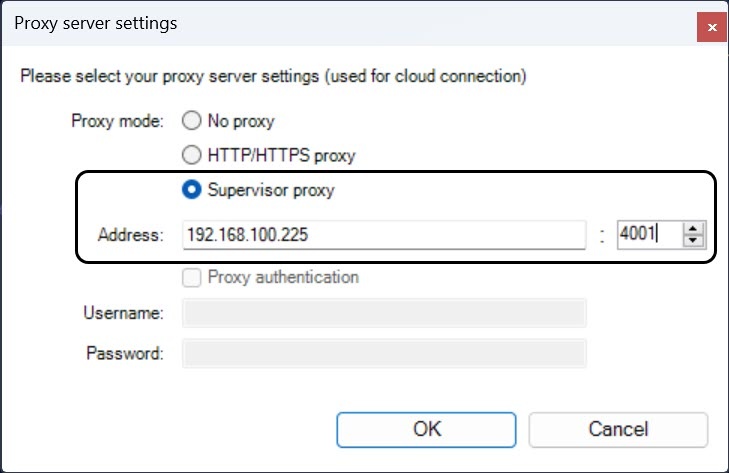
Start the Client and in the proxy server settings, specify the Server external IP address and the forwarded port from step 2 (see Axxon One 클라이언트 시작).
- Enter the external IP address of the cluster Server (1) and click the
 button.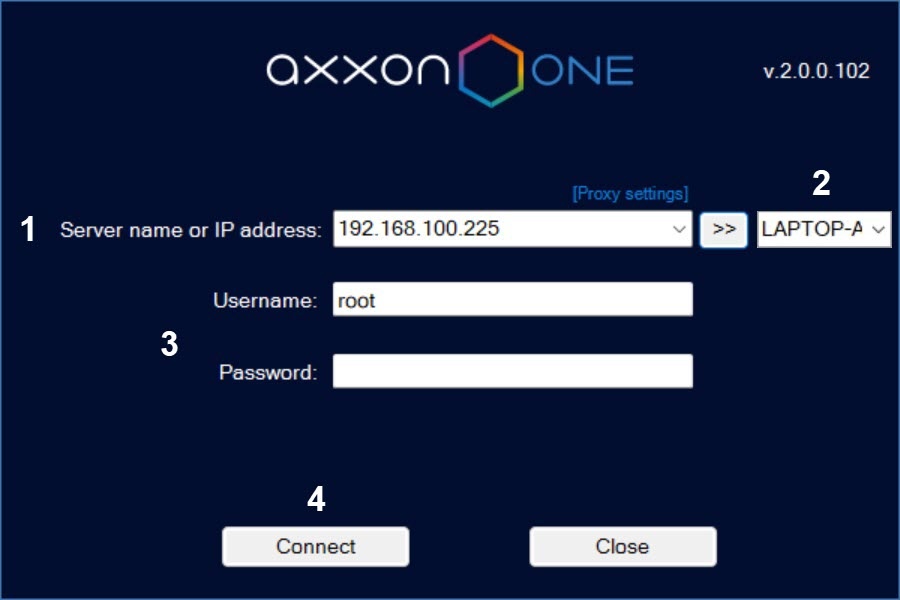
From the list (2), select the node you want to connect to. To quickly find the node, you can enter the first characters of its name in this field.
- 매개변수에 대한 포트 값을 지정합니다. . 예를 들어 포트 4001을 지정합니다 (Axxon One 소프트웨어 패키지에서 사용하는 포트 참고).
- 포트 4000 및 4001을 2단계에서 지정한 서버의 내부 IP 주소로 전달합니다.
클라이언트를 시작하고 프록시 서버 설정에서 서버 외부 IP 주소와 2단계에서 전달한 포트를 지정합니다 (Axxon One 클라이언트 시작 참고).
- 클러스터 서버의 외부 IP 주소를 입력하고 (1) 버튼을 클릭합니다.
목록에서 연결하려는 노드를 선택합니다 (2). 이 필드에 해당 이름의 첫 번째 문자를 입력하여 노드를 빠르게 찾을 수 있습니다.
- 사용자 이름과 비밀번호를 입력하고 (3) Connect(연결) 버튼을 클릭합니다 Enter the username and password (3) and click the Connect button (4).
| Note | ||
|---|---|---|
| ||
If the connection to the Server to which the ports are forwarded fails, the connection to the cluster nodes behind NAT becomes unavailable. If necessary, configure the network infrastructure so that a proxy server is configured for multiple cluster Servers. This will provide fault tolerance and the ability to connect to the cluster even if one of the Servers becomes unavailable포트가 전달된 서버에 대한 연결이 실패하면 NAT 뒤의 클러스터 노드에 대한 연결을 사용할 수 없게 됩니다. 필요한 경우 여러 클러스터 서버에 대해 프록시 서버가 구성되도록 네트워크 인프라를 구성합니다. 이렇게 하면 서버 중 하나를 사용할 수 없게 되더라도 내결함성과 클러스터에 연결할 수 있는 기능이 제공됩니다. |
Overview
Content Tools