
Go to documentation repository


Page History
You can rotate a video 비디오를 90°, 180° or 270° degrees또는 270°로 회전할 수 있습니다.
| Info | ||
|---|---|---|
| ||
If you enable video rotation, only video in Live Video and Archive modes is rotated:
|
To rotate video, complete the following steps:
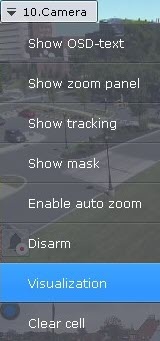
- In the viewing tile context menu, select Visualization.
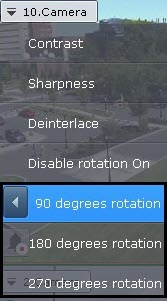
- Select the angle of rotation (clockwise).
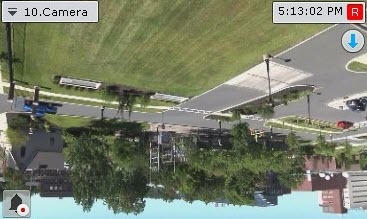
Video rotation is now complete.
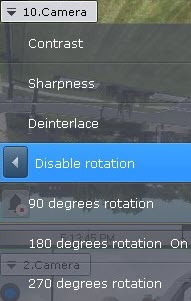
To disable video rotation, select Visualization → Disable rotation in the viewing tile context menu.
비디오 회전을 활성화하면 라이브 비디오 및 아카이브 모드의 비디오만 회전됩니다.
|
비디오를 회전하려면 다음 단계를 완료하세요.
- 보기 타일 컨텍스트 메뉴에서 시각화를 선택합니다.
- 회전 각도(시계 방향)를 선택하세요.
비디오 회전이 완료되었습니다.
비디오 회전을 비활성화하려면 보기 타일 컨텍스트 메뉴에서 시각화 → 회전 비활성화를 선택하세요.
Overview
Content Tools