
Go to documentation repository


Page History
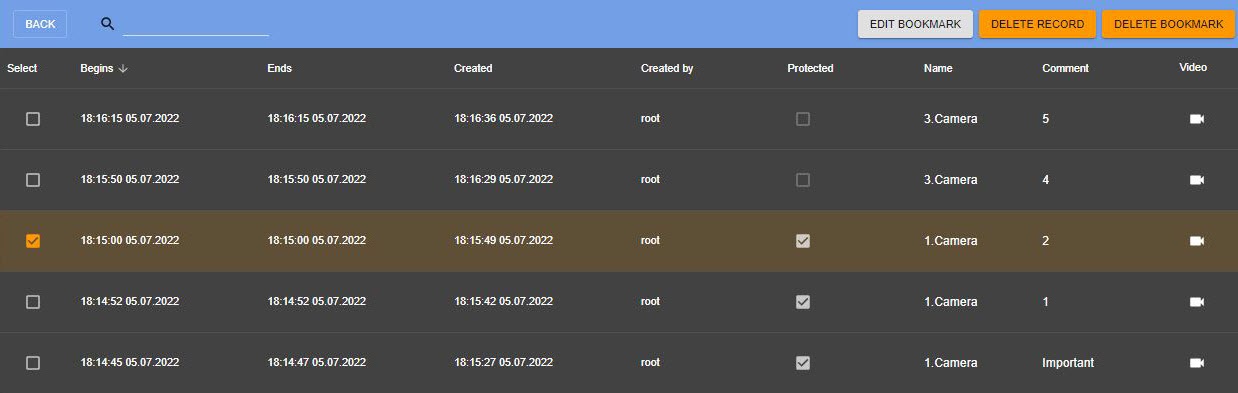
A bookmark represents either a comment in the archive (see 북마크는 아카이브 내의 코멘트 (운영자 코멘트), or a protected video recording (see Protecting video footage from FIFO overwriting).To work with bookmarks, click the  button in the top right corner of the Web-Client window, and select the Archive Bookmarks option 참조) 또는 보호된 비디오 녹화본 (FIFO 덮어쓰기로부터 영상 보호 참조)을 나타냅니다.
북마크를 사용하려면 버튼을 클릭하세요. 웹 클라이언트 창의 오른쪽 상단에 있는 버튼을 클릭하고 북마크 보관옵션을 선택하세요.
| Note | ||
|---|---|---|
| ||
You can access only the bookmarks on the visible part of the archive (see Configuring access restrictions to archive). The bookmarks belonging to the archive fragment that was overwritten in a loop will not be displayed. |
You can:
- Edit a bookmark.
- Delete a bookmark.
- Un-protect a protected video.
- Delete a protected video.
Use the search bar to locate a necessary bookmark.

To proceed to a particular video, click the  button in the Video column. To return to a main page, click the BACK button.
Editing a bookmark
To edit a bookmark, do the following:
- Select the required bookmark in the table.
- Click the EDIT BOOKMARK button.
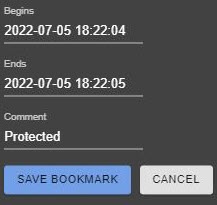
- If necessary, you can change the time interval and/or a text comment.
- Click the SAVE BOOKMARK button.
Deleting a bookmark
To delete a bookmark, select it in the table and click the DELETE BOOKMARK button.
You can delete several bookmarks. To do this, set the checkboxes next to the required bookmarks and click the DELETE BOOKMARK button.
Un-protecting a video
To un-protect a video, clear the Protected checkbox next the bookmark.
Deleting a protected video
아카이브의 보이는 부분에 있는 북마크에만 접근할 수 있습니다 (아카이브 접근 제한 구성 참조). 루프로 덮어쓴 보관 파일 조각에 속하는 북마크는 표시되지 않습니다. |
다음 기능 할 수 있습니다:
- 북마크를 편집합니다.
- 북마크를 삭제합니다.
- 보호된 비디오의 보호를 해제합니다.
- 보호된 비디오를 삭제합니다.
검색창을 이용해 필요한 북마크를 찾으세요.
특정 비디오로 이동하려면 비디오 열의 버튼을 클릭합니다. 메인 페이지로 돌아가려면 BACK 버튼을 클릭합니다.
북마크 편집
북마크를 편집하려면 다음을 수행하세요.
- 표에서 필요한 책갈피를 선택하세요.
- 북마크 편집 버튼을 클릭하세요.
- 필요한 경우 시간 간격 및/또는 텍스트 주석을 변경할 수 있습니다.
- 북마크 저장 버튼을 클릭하세요.
북마크 삭제
북마크를 삭제하려면 표에서 북마크를 선택하고북마크 삭제 버튼을 클릭하세요.
여러 북마크를 삭제할 수 있습니다. 이를 위해 필요한 북마크 옆의 확인란을 설정하고 북마크 삭제(DELETE BOOKMARK) 버튼을 클릭합니다.
비디오 보호 해제
비디오의 보호를 해제하려면 북마크 옆에 있는 보호됨 확인란의 선택을 취소하세요.
보호된 비디오 삭제
보호된 비디오를 삭제하려면 보호된 북마크를 선택하고 녹화 내용 삭제 버튼을 클릭하세요
...
.
Overview
Content Tools