
Go to documentation repository


Page History
The Post-alarmrecord mode is the record mode for recording post-alarm events that performs recording for a specified period after recording time period upon the end of an alarm event.
By default, post-alarm recording is disabled. To enable the post-alarm recording, do the following:
- Go to the Hardware tab in the System settings dialog box (1).Select window.
- In the objects tree on the Hardware tab, select the Camera object corresponding to the required camera in the objects tree (2). The settings panel for the selected object is displayed on the right of the adjusted camera.
- Select the Hardware tab.Go to the Basic settings tab on the settings panel of the Camera object (3).
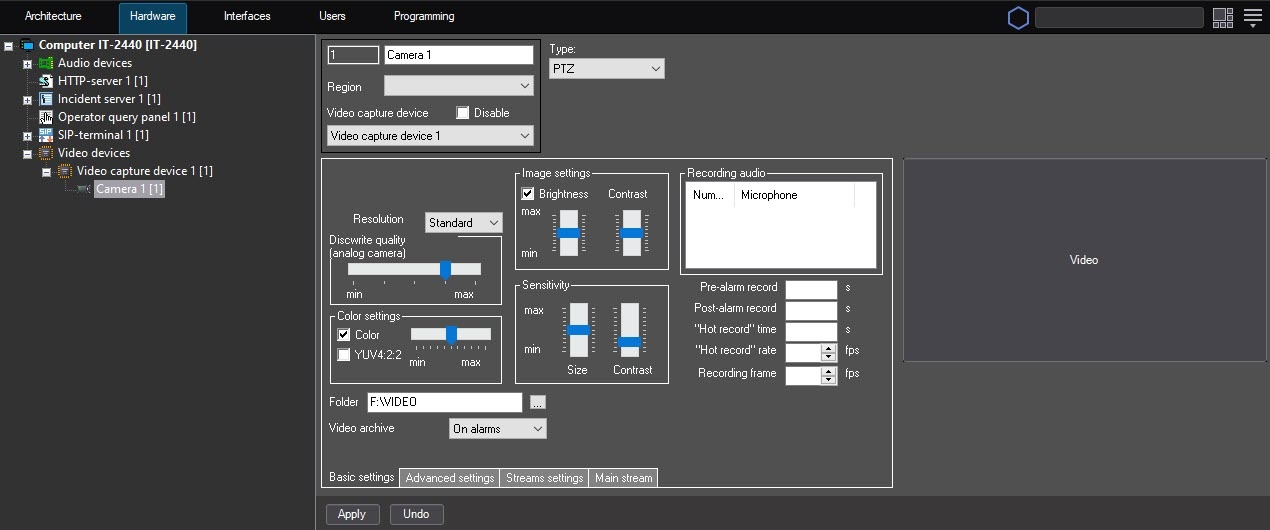
- In the Post-alarm record field, specify the required interval (sec) of post-alarm events recording (4)time interval in seconds during which the recording continues upon the end of an alarm event.
- Click the Apply button (5).
Configuring video in the post-alarm record mode is complete.
Overview
Content Tools