
Go to documentation repository


Page History
To set the parameters of the Audio audio player interface boxwindow, do the following:
- Go to the settings panel of the Audio player interface box object.
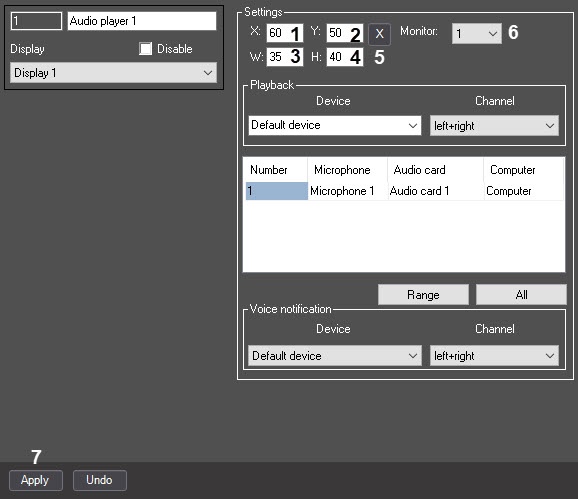
- Set the position of the Audio audio player interface box position window in one of the following ways:
- Manually:
- Set the coordinates of Audio player window’s the upper left upper corner of the audio player window: fields the X (the horizontal indent from the left image border) and and Y (the vertical indent from the upper image border - ) fields (1 and , 2). Coordinates are given in percentage in relation to expressed as percentages relative to the screen size horizontally and vertically.
Set the dimensions of the Audio audio player interface box: fields W (window’s width) and H (window’s height) – 3 and 4. Dimensions are given in percentage in relation to window: the W (the width of the window) and H (the height of the window) fields (3, 4). Dimensions are expressed as percentages relative to the screen size horizontally and vertically.
Info title Note. Minimal The minimal allowed value of parameter the W is parameter is 35%, H – is40%. With If you set the lesser value, the displayed width or height of the window will correspond corresponds to the minimal allowed value.
- With a Using the test window:
- Click X the
 button (5).
 - Position Place the Set opened Specify dimensions test window where the Audio audio player window should must be displayed.

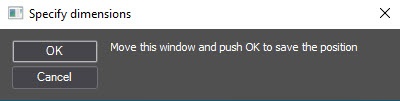
- Click the OK button.
As a result, the coordinates in the fields X, Y, W, H will be fields are set in accordance with the size and position of the test window.
- Click X the
- Manually:
From the Monitor drop-down list (6), select the number of the computer monitor for which coordinates are specifying (6)specified.
Info title Note. The monitors Monitors are numbered in the order of their physical location from left to right, from top to bottom, i.e. the 1st monitor is the one . Thus, the number 1 corresponds to the monitor in the upper left corner regardless of which monitor is assigned as the main one or what number the monitor has first one in the OS numeration.
- Click Apply button to save all the changes (7).
Setting the parameters of the Audio audio player interface box window is completedcomplete.
Overview
Content Tools