
Go to documentation repository


Page History
Depending on what video capture card is in useused, the Relay objects corresponding to relays connected to the 4/4 Sensorsensor-Relay relay card (low profile) are created under in the hardware tree based on the Video Capture Device objects capture device object of one of the following types: SC200Q4 Low profile (FS 115), SC300Q16 (FX 4), SC300D16 (FX 8), SC310N16 (FX 16), SC3B0N16 (WS 216), SC230N4 and SC590N4.
At For the relay to operate, you must create at least one Camera object is to be created under based on the same Video Capture capture device object for relay to work.
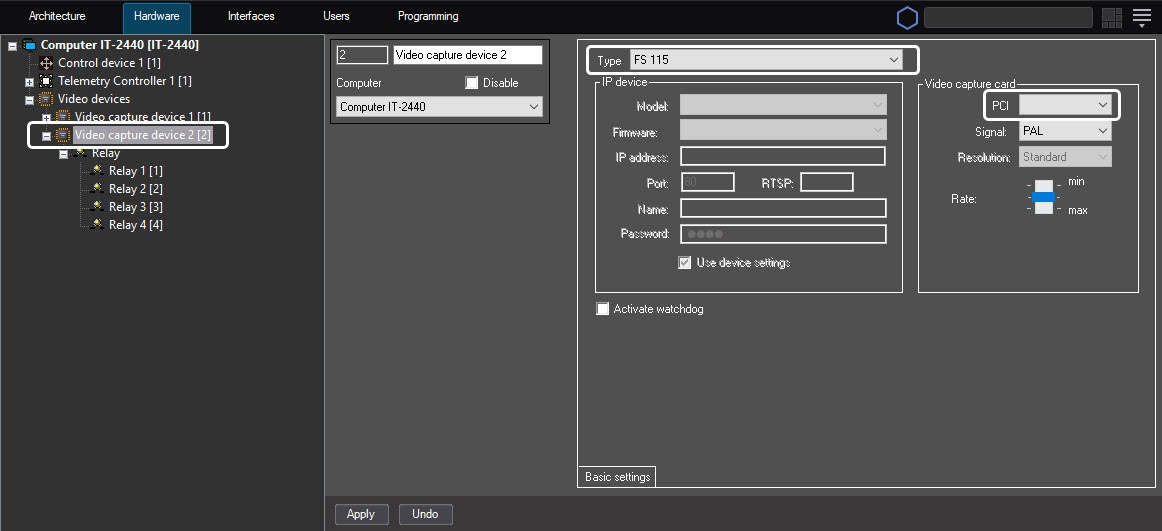
The You must create the Relay objects are to be created under based on the Video Capture Device object that has capture device object to which the first PCI channel of the used physical video capture card is set.
For example, when you build the . E.g., when building security video subsystem with on the use basis of two SC300Q16 two SC300Q16 (FX4) and two Sensortwo sensor-Relay cards relay (low profile) the Relay objects are to be created under the Video Capture Device objects with cards, you must create the Relay objects based on the Video capture device objects with the 00 (for the first SC300Q16 first SC300Q16 (FX4) card) and 04 (for the second SC300Q16 second SC300Q16 (FX4) card) values of PCI channelschannel numbers.
If you connect the 4/4 Sensorsensor-Relay card relay(low profile) is installed on SC3B0N16 card to the SC3B0N16 (WS216) video capture card, then the Relay objects are to be created under the Video Capture Device object with 04 value you must create the Relay objects based on the Video capture device object with the 04 number of the PCI - channel.
For SC310N16 For the SC310N16 (FX16) video capture card the , you can create the Relay objects can be created under based on the Video Capture Devicecapture device object with the 00 or 08 value number of the PCI channel. Working The working channel is discovered experimentally.For
When you connect the relay to the SC230N4 video capture card, you must create the Relay objects are to be created under the Video Capture Device based on the Video capture device object with the 03 value number of the PCI channel.
For the SC590N4 video capture card, you can create the Relay objects can be created under based on the Video Capture Devicecapture device object with the 01 number of the PCI - channel equal to 01 (see see the Connecting 4/4 Sensor-Relay (low profile) cards section for Sensor-Relay cards for the sensor-relay card connected to low contacts of the J2 connector of the CS590N4 card) and to the 03 (for Sensorfor the sensor-Relay relay card connected to top contacts of J2 connector the J2 connector of the SC590N4 card). If you use the SC590N4 card is in use do not create not , we recommend creating no more than 4 four Relay objects for one Video Capture Devicecapture device object.
| Info | ||
|---|---|---|
| ||
Number The number of PCI channels (the number of the Video Capture Device objectscapture device objects) for all types of cards is given in in the Features of video subsystem configuration section. |
One You can create up to 4 four Relay objects under based on the Video Capture Devicecapture device parent object. When configuring the Relay objects one is to you configure the Relay objects in Axxon PSIM, you must specify the channel numbers of the relay connection (executive devices) to the 4/4 Sensorsensor-Relay card relay (low profile) according to card. The channel numbers are allocated in accordance with the external pinout of the card.
To change the channel numeration, use the Channel Numbernumber list on the settings panel of the Relay object.
When you use the 4/4 Sensor4 sensor-Relay card relay (low profile) allows connecting card, up to 4 four relay connection channels are available according to the configuration of the license key file.
The figure below shows an example of the channel numeration configuration of 4 example of allocating the channel numeration of four relays connected to one 4/4 Sensor4 sensor-Relay card relay (low profile) card.
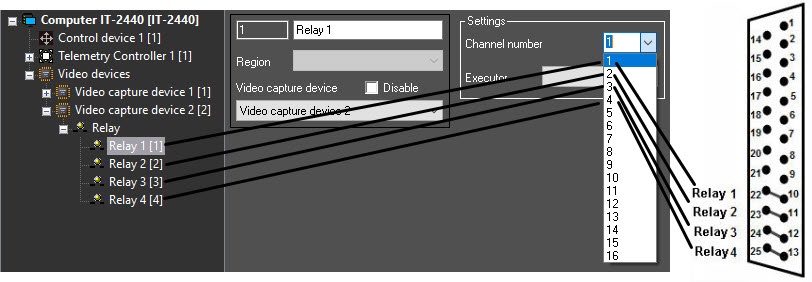 Channels of For the second and the next 4/4 Sensor4 sensor-Relay card relay (low profile) are numbered 1-4card, the allocation of channel numbers is also performed in the range 1—4.
Overview
Content Tools