...
The configuration of the Detection of moving against crowd flow module includes
...
specifying the detection area,
...
configuration parameters, and
...
detector's characteristics.
- Go to the settings panel of the Detection of moving against crowd flow object
settings panel - that is created on the basis of
the - the Camera object on the Hardware tab of the System Settings window.
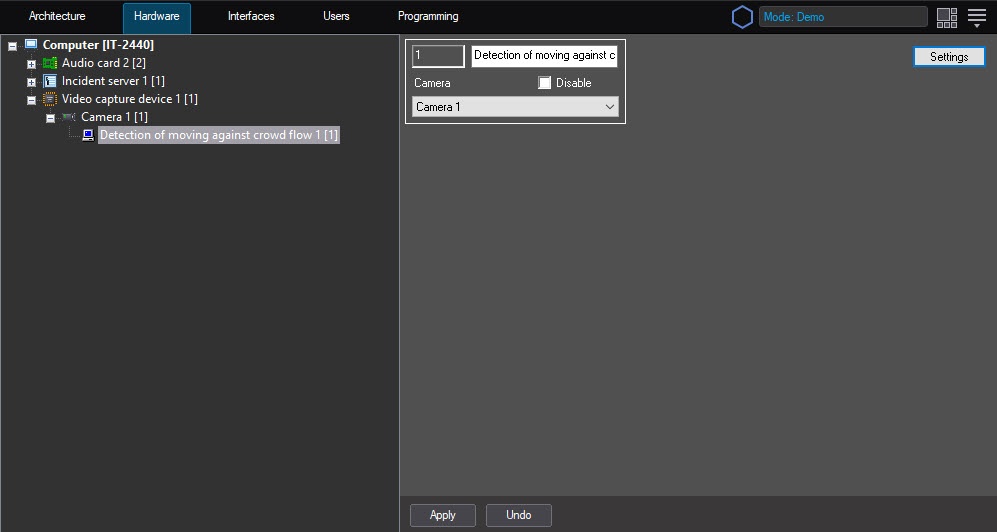 Image Modified
 - Click the Settings button. The Detection settings window will openopens.
- Specify the area of interest on the videodetector's surveillance area:
- On the Select area tab, click the Stop video button to pause the a video.
- Click the Area of interest button.
 Image Removed
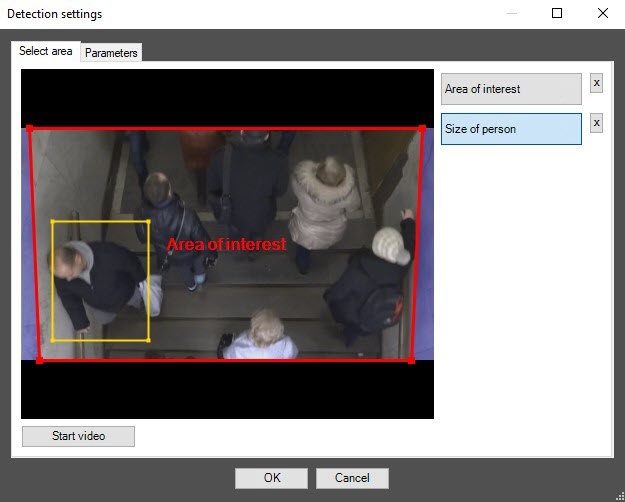 Image Added
 - On the captured video image, specify set the detection area using the mouse. To do that, set specify the nodal points nodes of the area of interest using the left mouse button. Area polygon that restricts it. The area is considered to be specified when the last nodal point is consisted consistent with the first one. It is possible to You can add only one area. When attempting you try to add the second area, the first one will be is deleted. After you add an area specifying, the remaining part of the video image will be is darkened.
| Info |
|---|
|
To remove the area, click the  Image Removed Image Removed  Image Added button to the right of the Area of interest button. Image Added button to the right of the Area of interest button. |
Click the Size of person button. Set the required person size using the mouse. To do this, left- click on the captured video image frame and extend a rectangular area the rectangle to the required size.
| Info |
|---|
|
To remove the areaspecified person size, click the Image Removed Image Added button to the right of the Size of person button. |
- Set up Specify the parameters of detection of moving against crowd flow:
- Go to the Parameters tab.
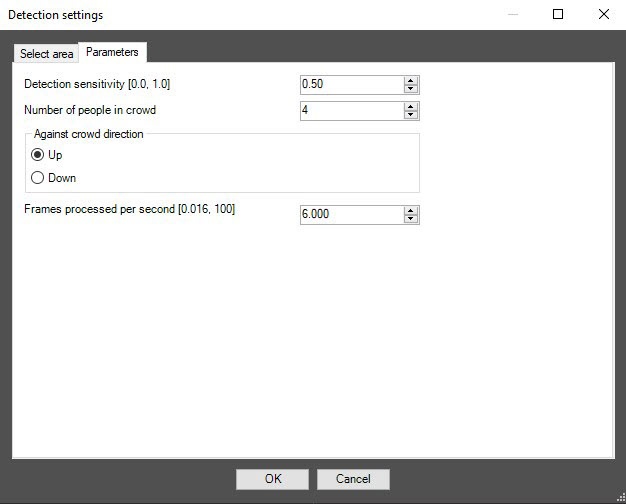 Image Removed
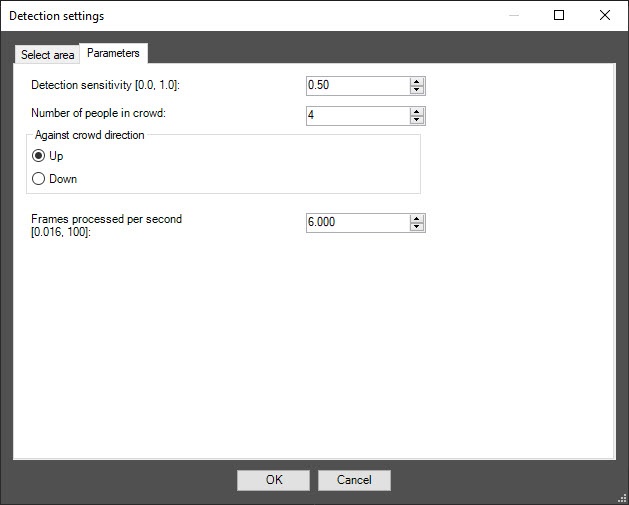 Image Added
 - In the
Detector - Detection sensitivity [0.0, 1.0]
field- field,
specify - specify the detector's sensitivity to detecting moving objects in the detection area
of interest- .
Optimal - The optimal value of the parameter is selected experimentally by testing the
detection - detector for
triggers - event generation in the required conditions. The range of values is from 0 to 1. The higher the
detection - sensitivity, the greater the probability of false
alarms- event generation. The less the
detection - sensitivity, the greater the probability of missing an event
missing- .
- In the Number of people in crowd field, specify the minimum number of people moving in the direction of a crowd in which the
detection should trigger- detector must generate an event. The default value
is - is 4.
- Set the Against crowd direction switch to the position
, - corresponding to the
objects - object movement against a crowd on the video image: Up or Down.
- In the Frames processed per second [0.016, 100] field, set the number of frames per second that will be processed by the detection tool. The range of values is from 0,016 to 100. the detector processes in the range 0.016–100. The higher the value, the more accurate accurately the detection tool detector works, but the higher the load on the CPU load.
- Click the OK button.
Configuring the Detection detection of moving against crowd flow module is complete.


