
Go to documentation repository


Page History
...
The AviExport utility is used for exporting video archive for the specified period in the format of the file system of Axxon PSIM, or in the AVI format with the possibility ability to change the coding format (codec). AviExport allows you to export the main archive, the videogate archive, and the backup archive (see General information on working with archives).
...
Both 32-bit and 64-bit versions of the AviExport utility are available. The 64-bit version is run when the 64-bit modules are enabled (see Configuring the use of 64-bit modules).
...
Start the utility
You can run the AviExport utility in the interface of the Video video surveillance monitor interface in in one of the following ways:
- Click the
 button on the control panel. The control panel must be enabled in the Video video surveillance monitor—see Setting the parameters of the Monitor interface window.
 - In the Created bookmarks window (see List of bookmarks).
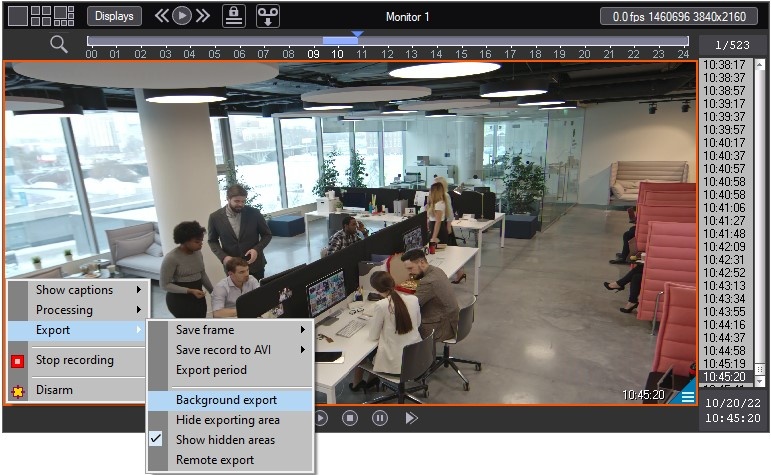
- In the archive mode, using the Export → Background export item of the Surveillance surveillance window function menu.
| Info | ||
|---|---|---|
| ||
The |
...
Interface
The interface of the AviExport utility is presented in the figure.
...
Click << in the bottom right corner to hide advanced settings, leaving camera selection and basic export settings only. At the next startsstart, the utility is launched in the expanded or basic mode depending on the mode it was shut down in.
...
| Info | ||
|---|---|---|
| ||
The button to switch between the advanced and basic settings can be unavailable when 1 is set for the SimpleDlgModeLock key of the HKEY_LOCAL_MACHINE\SOFTWARE\Wow6432Node\AxxonSoft\AxxonPSIMPSIM\Video\AviExport registry (see Registry keys reference guide). A vertical scroll bar can appear in the AviExport Utility utility window at low screen resolutions. |
Overview
Content Tools