
Go to documentation repository


Page History
시스템 로그는 시스템 오류 항목을 포함하여 이벤트에 대한 시스템 정보가 포함된 로그입니다.
시스템 로그는 각 서버의 로컬 데이터베이스에 저장됩니다. 설정 아래의 사용자 탭 에서 사용자 그룹의 시스템 로그에 대한 액세스를 설정할 수 있습니다 (사용자 권한 설정 섹션 참고).
기본적으로 메타데이터 파일은 서버의 메타데이터 데이터베이스에 저장됩니다: C:\ProgramFiles\AxxonSoft\AxxonOne\Metadata\vmda_db\VMDA_DB.0\vmda_schema; 필요한 경우 사용 가능한 네트워크 저장소에 배치할 수 있습니다.
시스템 로그 및 메타데이터의 저장을 구성하려면:
- 설정 → 옵션 (1)→ 데이터 저장 (2)으로 이동하세요.
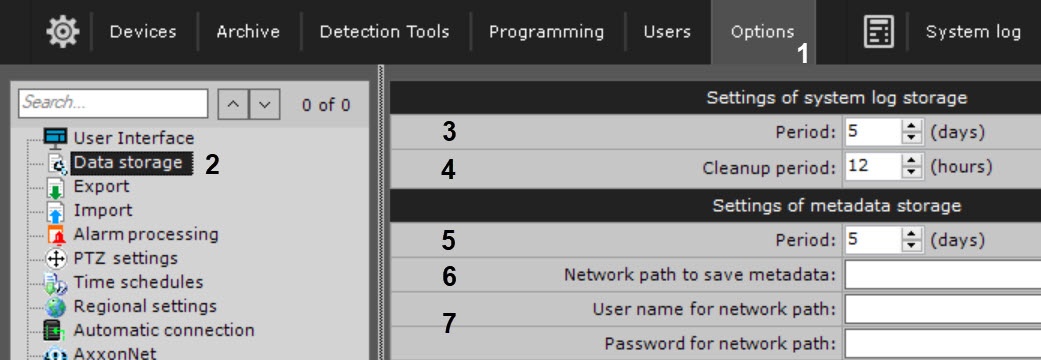
기간 필드 에 서버 데이터베이스에 시스템 로그를 저장하고 데이터베이스에 메타데이터를 저장하는 일수를 입력합니다 (3). 최대 시간은 1000일입니다
The system log is a log containing system information on events, including system error entries.
The system log is stored in a local database for each server. You can set access to the system log for a user group in the Users tab under Settings (see the section titled 사용자 권한 설정).
...
To configure storage of the system log and metadata:
- Go to Settings → Options (1)→ Data storage (2).
In the Settings of system log storage parameters group, in the Period field, enter the amount of days to store the system log in the Server’s database (3). The maximum time is 1000 days.
Note title Attention! If you enter zero value, system Log events will be stored 0 days.
- In the Cleanup period field, enter the amount of hours after which outdated events will be purged from the system log (4). Outdated events are events that have been stored in the system log for a period greater than that indicated in the previous step.
0 값을 입력하면 시스템 로그 이벤트가 0일 동안 저장됩니다.
- 정리 기간 필드에 오래된 이벤트가 시스템 로그에서 제거될 때까지의 시간을 입력합니다 (4). 오래된 이벤트는 이전 단계에서 표시된 기간보다 오랜 기간 동안 시스템 로그에 저장된 이벤트입니다.
메타데이터 저장 설정 매개변수 그룹의 기간 필드에 데이터베이스에 메타데이터를 저장할 일수를 입력합니다(5). 최대 시간은 1000일입니다In the Settings of metadata storage parameters group, in the Period field, enter the amount of days to store metadata in the database (5). The maximum time is 1000 days.
Note title Attention! - 0 값을 입력하면 메타데이터 보존 시간이 무제한이 됩니다.
- 여유 디스크 공간이 15GB 미만인 경우 메타데이터 DB를 덮어씁니다. 즉, 가장 오래된 데이터 기록 위에 새 데이터가 기록됩니다 (
- If you enter zero value, metadata retention time becomes unlimited.
- If you have less than 15 GB of free disk space, the metadata DB is overwritten, that is, the new data is recorded over the oldest data records (see 자가진단 서비스에 대한 일반정보 참고).
Info title Note The metadata database is purged of video recordings that have been stored for more than the specified storage period:
- Every 12 hours after Axxon One is started.
- Every time you start the MomentQuest forensic search tool (see Forensic Search for Fragments (MomentQuest)).
If the camera is not recording when DB is cleaned up, then its recordings are preserved irrespective of their timestamp.
지정된 저장 기간보다 오랫동안 저장된 비디오 녹화는 메타데이터 데이터베이스에서 제거 됩니다.
- Axxon One이 시작된 후 12시간마다
- MomentQuest 포렌 검색 도구를 시작할 때마다 (조각에 대한 포렌식 검색(MomentQuest) 참고).
DB를 정리할 때 카메라가 녹화 중이 아닌 경우 녹화 내용은 타임스탬프와 관계없이 보존됩니다.
메타데이터 데이터베이스는 필요한 경우 NAS에 저장할 수 있습니다 (기본적으로 설치 중 설정된 대로 로컬에 위치합니다). 다음을 수행하십시오.
메타데이터 데이터베이스의 네트워크 대상 경로를 입력합니다 (6).
사용자 이름과 비밀번호를 입력합니다 (7). 사용자는 NAS에 액세스할 수 있는 권한이 있어야 합니다.
The metadata database can be stored on NAS if necessary (by default, it is located locally as set during 설치). Do the following:
Enter a path to the network destination for metadata database (6).
Enter the user name and password (7). The user must have permissions to access the NAS.
Info title Note If you clear the path to NAS, metadata will be stored in the local database again
- Click the Apply button.
NAS 경로를 삭제하면 메타데이터가 다시 로컬 데이터베이스에 저장됩니다.
- 적용 버튼을 클릭하세요.
이제 시스템 로그 구성이 완료되었습니다Configuration of the system log is now complete.
Overview
Content Tools