
Go to documentation repository


Page History
페일오버 노드에 대한 자동 연결은 장애 조치 시스템 클러스터의 단일 서버에 연결하여 구성됩니다. 자동 연결에 노드를 추가하려면 다음을 수행하십시오.
실패한 시도를 고려하기 전에 성공적인 연결을 기다려야 하는 시간을 결정하는 연결 시간 제한 매개변수 (1)를 지정합니다. 기본 시간 초과 값은 60초이고 최대값은 5분입니다. 이 설정을 사용하면 자동 연결이 즉시 연결을 시도합니다. 연결이 실패하면 서버는 사용자가 지정한 시간(시간 초과) 동안 기다린 후 연결을 다시 시도합니다.
- 지정된 시간 초과 이후 자동 연결 시도의 최대 횟수를 지정합니다 (2).
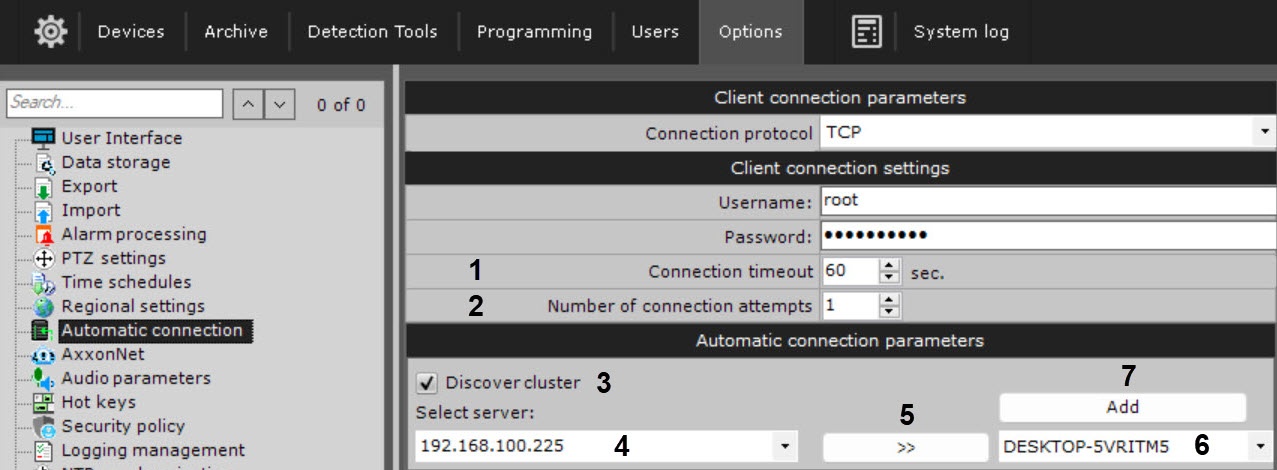
- Discover cluster(클러스터 검색) 확인란을 선택합니다 (3).
- 클러스터 서버의 IP 주소를 입력하고 (4) >> 버튼을 클릭합니다 (5).
- 자동 연결에 추가하려는 노드를 목록에서 선택합니다 (6).
- Add(추가) 버튼을 클릭합니다
The automatic connection to a failover node is configured by connecting to a single Server of the failover system cluster. To add a node to automatic connection, do as follows:
Specify the Connection timeout parameter (1), which determines how long one must wait for a successful connection before considering the attempt to be unsuccessful. The default timeout value is 60 seconds, the maximum value is 5 minutes. When using this setting, automatic connection will attempt to connect immediately. If the connection fails, the Server will wait for a user-specified period of time (timeout) and retry the connection.
- Specify the maximum number of automatic connection attempts after the specified timeout (2).Specify the maximum number of automatic connection attempts after the specified timeout (2).
- Set the Discover cluster checkbox (3).
- Enter the IP address of any cluster Server (4) and click the >> button (5).
- Select from the list the node you want to add to automatic connection (6).
- Click the Add button (7).
Overview
Content Tools