
Go to documentation repository


Page History
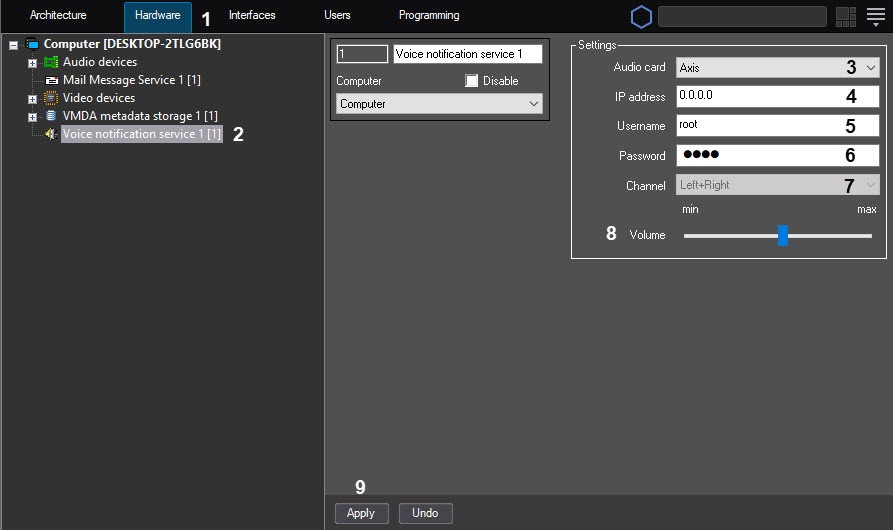
To set up configure the Voice Notification Servicenotification service object, do the following:
- Go to the Hardware tab of the System Settingssettings dialog window (1).
- Create the Voice Notification Service object in notification service object on the basis of the Computer node object in the objects tree (2). The object appears is displayed in the objects tree, and the settings panel for of this object opens is displayed on the right side of the System Setting setting dialog window.
 Choose the device in
 - From the Audio card list to send the notification to (3).Specify
- (3), select the device to which the voice notification is sent.
- In the IP address field (4), specify the IP address of the network device ( sound card,
- the network map of the IP camera or Linux Hub) ,
- that is used to access this device over
- via the network (4). If the sound
- . When you select the audio card of the local computer is selected
- , this
- the given field is disabled
- inactive. Specify
- In the Username of
- field (5), enter the username when you select the network device ( sound card,
- the network map of the IP camera or Linux Hub) , used to
- that is used to access this device over
- via the network (5). If the sound
- . When you select the audio card of the local computer is selected
- , this
- the given field is disabled
- inactive. Specify
- In the Password of
- field (6), enter the password when you select the network device ( sound card,
- the network map of the IP camera or Linux Hub) , used to
- that is used to access this device over
- via the network (6). If the sound
- . When you select the audio card of the local computer is selected
- , this
- the given field is disabled
- inactive. Choose
- From the headphones
- Channel list ( speakers) playback option in the Channel drop-down list (7).
- 7), select the way of playing back audio by the software tools using headphones (speakers):
- For the audio card with
If the soundcard has - two outputs (left/right), the list contains the following
options- positions:
a) Left, b) - Left;
- Left + Right
, c) - ;
- Right.
If - For the
sound card has N outputs- audio card with the number of outputs equal to N, the list contains the
numbered - enumerated outputs from 0 to (N-1).
Specify - Set the Volume
- volume level using the Volume slider (8). Press the Apply button to
- To save the settings for the Voice Notification Service object
- of the Voice notification service object, click the Apply button (9).
Overview
Content Tools