
Go to documentation repository


Page History
To set up an access schedule for a Hikvision readerconfigure the Hikvision reader access plan settings, do the following:
- Hikvision Go to the settings panel of the Hikvision 26X Reader or Hikvision 28X Reader object setup panel.
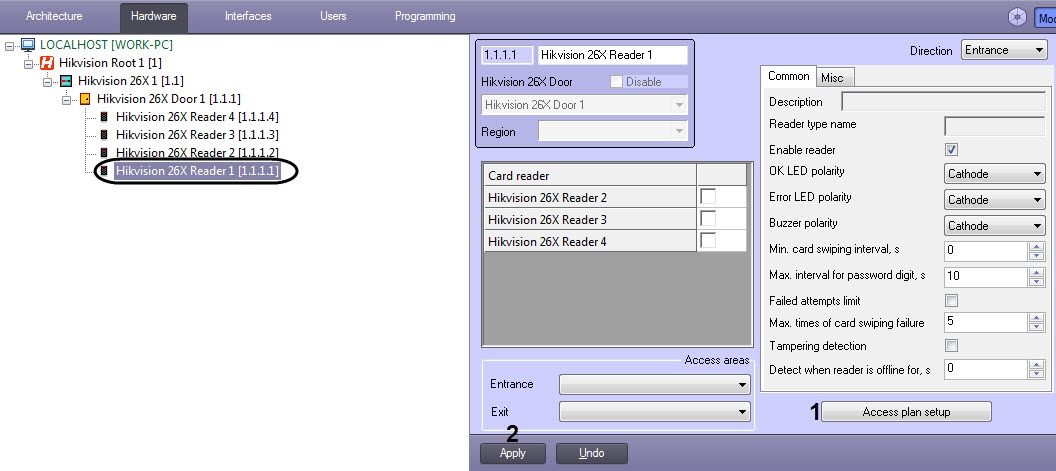
- Click on the Access Plan Setupplan setup button. The Reader Access Plan Setupaccess plan setup window opens.
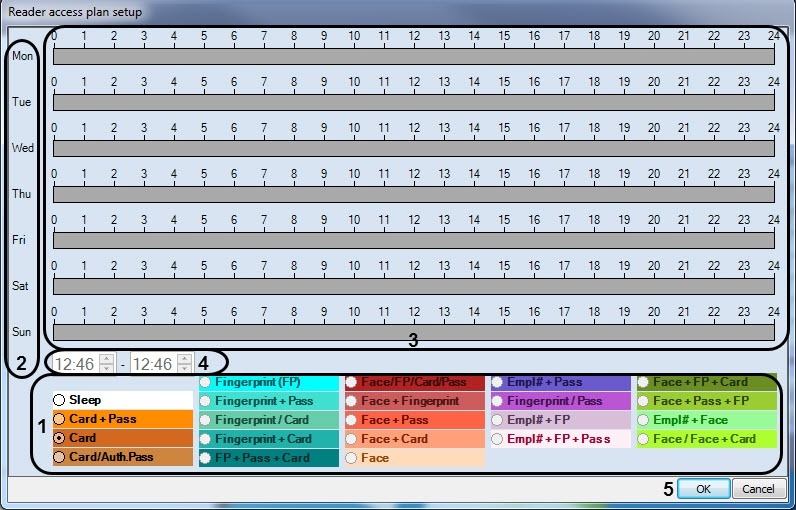
- Set the schedule in the Reader Access Plan window:
- Set your required access schedule in the corresponding pane (1).
- In the week day's column (2), use your mouse to set the required time slot (3).
- You can edit the time values for each slot (4): starting time in the left field and ending time on the right.
- Repeat steps 3a — 3c as necessary.
- Click the OK (5) button to save your settings.
In the area (1), set the required access type.
Info title Note. The Sleep access type stands for the sleep mode. The reader is not operable in this mode.
The Card + Pass access type means that you first need to swipe the card and then enter the password, only then the access is granted.
The Card/Auth.Pass access type means that you can swipe the card OR enter the password to access.
- In column (2), select the day of the week, and using the mouse, set the time interval for this access type in the corresponding line in area (3).
- If necessary, adjust the time interval in area (4), where the left field indicates the beginning time, and the right field indicates the ending time of this time interval.
- Click OK (5) to save the settings.
- Click Apply (2).
The access plan settings of the Hikvision reader are The access schedule for the Hikvision reader is now configured.
Overview
Content Tools