
Go to documentation repository


Page History
The main motion detection tool detector is used to detect motion on the guarded location protected facility and to generate the system alarm events when the relevant camera is armed.
Main The main motion detection tool detector configuration is performed for each camera independently.
In most cases the default settings for Main the main motion detection tool detector are sufficient for it to function properly.
To configure Main the main motion detection tooldetector, do the following:
Display the video surveillance monitor on the screen and check if Axxon PSIM properly registers alarms on camera.
If registration is proper, then additional settings may be skipped.Info title Note. If alarms on camera are registered improperly (for example, a
detection tooldetector is triggered by artificial or natural video signal noise (rain, snow, etc), a
detection tooldetector does not detect small object motion and high-speed motion),
a Main motion detection tool is to be configuredor if there is a big interval between the start of an event and the start of an alarm and the end of an event and the end of an alarm, you must configure the main motion detector. The proper setup of a
Mainmain motion
detection tooldetector allows significantly lowering the probability of unsatisfactory camera alarm detection.
It is recommended to set the key frames interval to at least 2 (for more information, see Configuring video compression) and to change the number of processed frames by setting the corresponding value of the DetectionFps parameter of the HKEY_LOCAL_MACHINE\SOFTWARE\Wow6432Node\AxxonSoft\PSIM\Video registry key (for more information, see Registry keys reference guide; for information on working with the registry, see Working with Windows OS registry). The key value corresponds to the maximum number of frames processed per second, which decompresses all frames and increases the load on the CPU.
- Go to the Hardware tab in the System settings dialog box (1).
- Select the Camera object corresponding to the camera on which a detection tool detector is configured , in the objects tree of the Hardware tab (2). The settings panel for the selected object appears on the right of the Hardware tab.
- Select the Basic settings tab on the settings panel of the Camera object (3).
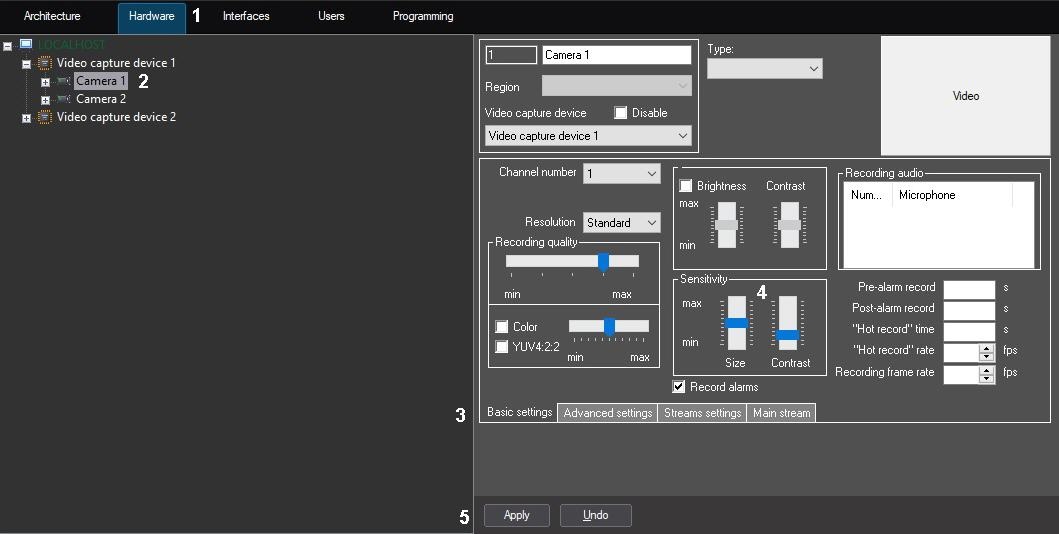
- Set the Size value by moving the slider of the same name (4). The value of this setting corresponds to the part of the total frame square , occupied by the smallest detected object. When an object bigger than the preset one moves, the motion detection tool detector switches to the alarm status.
The best value of the Size parameter is defined by testing the triggering of a detection tooldetector. With low values of the Size parameter, triggering by noise (including rain, snow) is more probable. With high values of the Size parameter, triggering by object motion is less probable.
The value that is slightly lower than the average size of the moving objects in the frame is recommended to be set to the Size parameter. If a detection tool detector triggers upon video signal noise, then it is necessary to change the Contrast parameter. - Set the Contrast value by moving the slider of the same name (4). The value of this setting corresponds to the contrast of the detected object.
The best value of the Contrast parameter is defined by testing the triggering of a detection tooldetector. With low values of the Contrast parameter, triggering by moving objects, the color spectrum of which is very similar to that of the background, is more probable. In most cases, the default Contrast setting (the average value) is sufficient. - Click the Apply button (5).
Main The main motion detection tool detector is now configured.
Overview
Content Tools