
Go to documentation repository


Page History
The Post-alarmrecord mode is the record mode that keeps performs recording for a specified time period upon the end of time after an alarm event occurs.
By default, post-alarm recording is disabled. To enable the post-alarm recording, do the following:
- Go to the Hardware tab in the System settings window.
- In the the objects tree on the Hardware tab, select the Camera object corresponding to the adjusted camera in the object tree.
- Go to the Select the Basic settings tab on the settings panel of the Camera object.
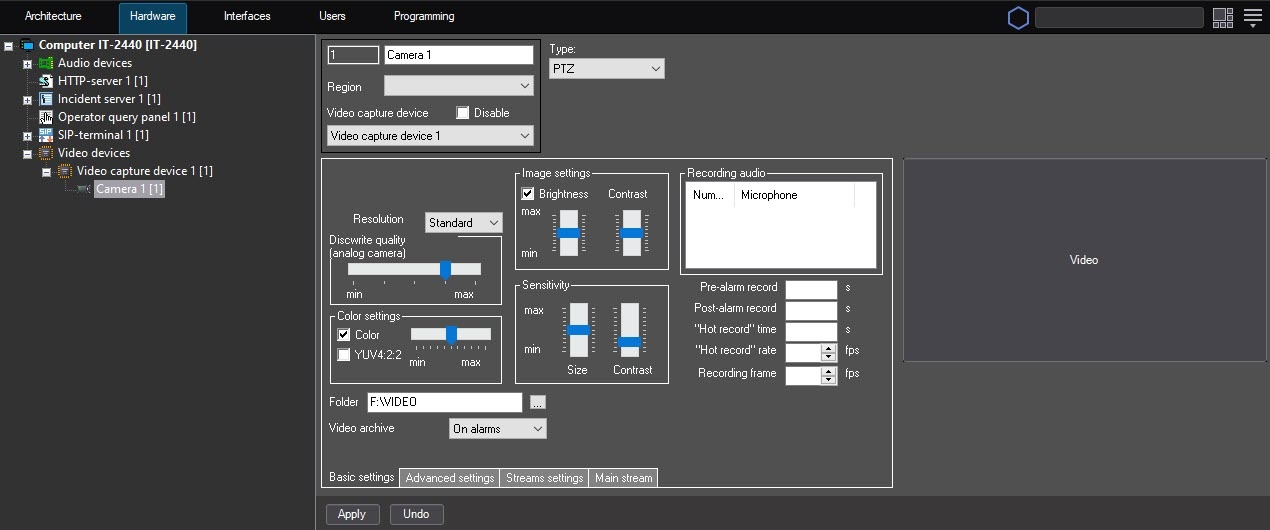
- In the Post-alarm record field, specify the time interval (sec) in seconds during which the recording continues after upon the end of an alarm event occurs.
- Click the Apply button.
Configuring video in the post-alarm record mode is complete.
Overview
Content Tools