
Go to documentation repository


Page History
...
- Go to the settings panel of the BACnet Client parent object that is created on the basis of the Axacfa object on the Hardware tab of the System settings window.
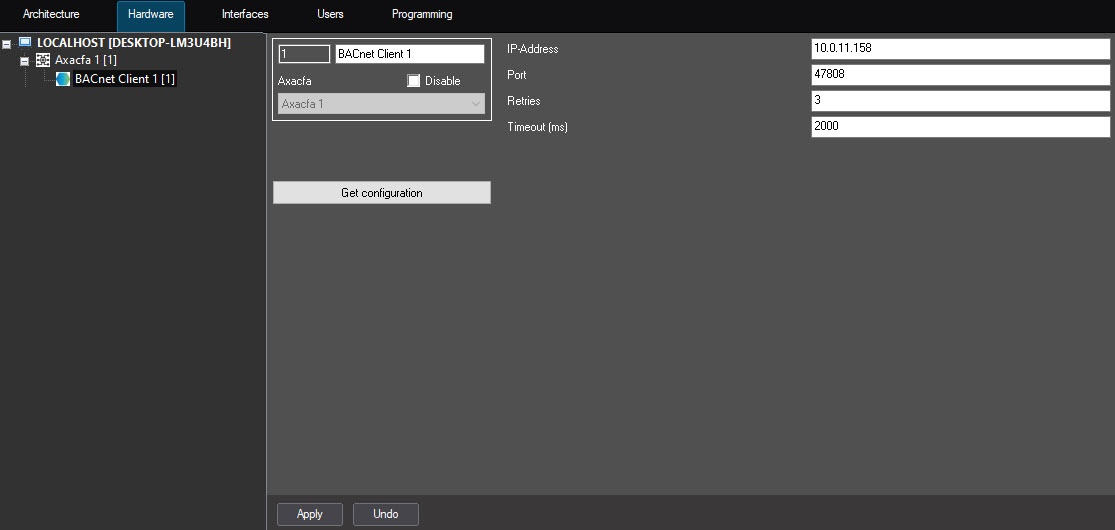
- In the IP-Address field, specify the IP address of the computer on which the Axxon PSIM software is installed.
- In the Port field, specify the number of the port to connect to the BACnet device. The default port is 47808.
- In the Retries field, specify the number of attempts to connect to the BACnet server. The default number is 3.
- In the Timeout (ms) field, specify in milliseconds the time interval between attempts to connect to the BACnet server. The default value is 2000.
- Click the Apply button to apply the settings.
- Click the Download configuration button.
As a result, the BACnet configuration is downloaded, and the hardware tree is built: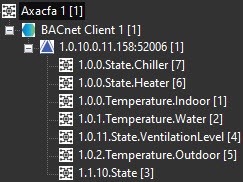
...
Overview
Content Tools