
Go to documentation repository


Page History
The In Intellect, the Time schedule object defines determines the time parameters in the Intellect system for any actions, which are to should be initiated within at certain periods of time.
The settings panel of the Time schedule object is shown in the figure.
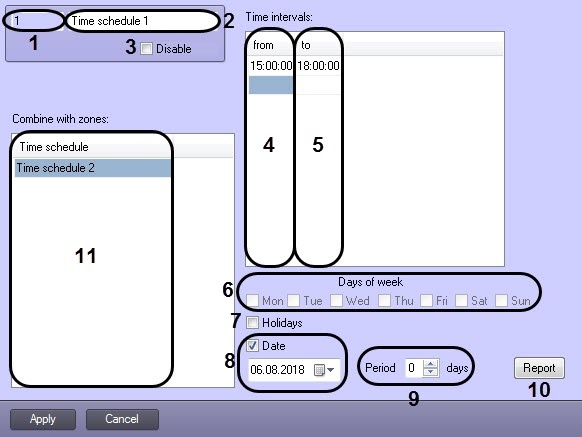
The table Table describes the setting parameters of the settings corresponding to the elements of the settings panel of the Time schedule object.
№ | Parameter | Method for entering setting the parameter value | Parameter description | Symbols usedRepresentation | Default value | Value range | |||
1 | Identification number | *
| Enter the value in into the field | Displays the identification number of the Time schedule object | Sequence of numbers | - | 1-65534 | ||
2 | Name | *Enter the value in into the field | Sets the Time schedule object name | Latin, Cyrillic and service characters | Time schedule | A line containing a sequence of any symbolscharacters (letters, digits, service characters apart fromexcept > and < symbolscharacters), case-insensitive. Number of symbols –characters—from 1 to 60 | |||
3 | Disable | CheckboxSet the checkbox | Sets the state (enabled or disabled) of the Time schedule object in the digital distributed video surveillance system with the distributed architecture | Boolean type | NoClear | Yes – Set—the Time schedule object is disabled and is not in use.isn't used Clear—No – the Time schedule object is enabled and is in useused | |||
The Settings group | |||||||||
The Time intervals subgroup | |||||||||
4From | from | Enter the value in into the field | Sets the initial point beginning of the time interval | Sequence of numbers | Not set | Time interval entry format: HH:MM | |||
5To | to | Enter the value in into the field | Sets the end point of the time interval | Sequence of numbers | Not set | Time interval entry format: HH:MM | |||
Out of the subgroup | |||||||||
6 | Days of week | CheckboxSet the checkbox NOTE. Is not activeNote. The checkboxes are inactive, if the Days field Date checkbox is checked set (item 8). | Sets the days of the week, when the given time schedule is active | Boolean type | NoClear | Yes – Set—the time schedule is active on the selected day.No – Clear—the time schedule is not active inactive on the selected day | |||
7 | Holidays | CheckboxSet the checkbox NOTE. Is not activeNote. The checkbox is inactive, if the Days field Date checkbox is checked set (item 8). | Sets the usage of Gives a command to use the given time schedule on holidays | Boolean type | NoClear | Yes – Set—the given time schedule is to be used on holidays.No – Clear—the given time schedule is not to be used on holidays | |||
8 | Days*Date | Checkbox | Set the checkbox | Determines if Defines, whether the given time schedule should be used permanently or only within a pre-defined at the specified period of time | Boolean type | NoClear | Yes – Set—the given time schedule should be used within a pre-defined is used at the specified period of time.No – Clear—the given time schedule should is used always be usedDate | ||
| Field | Enter the value in into the field | Sets the initial point, from which the use beginning of the given time schedule is to startusage | Sequence of numbers | Not activeInactive | Data entry format: DD:MM:YY | ||||
9 | Period | Select in the list | Enter the value into the field | Sets the Specifies periodicity in N days of N triggering of time schedule triggering, starting from the specified date (i.e. the time schedule triggers each every N-th day) | Sequence of numbers | Empty field | From 0 to 999999999999999 | ||
10 | Report | ButtonClick the button | Displays the dialog box with the time -schedules schedule activity table | - | - | - | |||
11 | Time schedule | Select in the value from the list | Sets the time schedule that is to be combined with which the given time schedule should be combined | The names Names of the registered Time schedule schedule objects registered in the system | - | Depends on the number of the registered Time schedule objects registered in the system | |||
...
schedule objects |
Overview
Content Tools