
Go to documentation repository
...
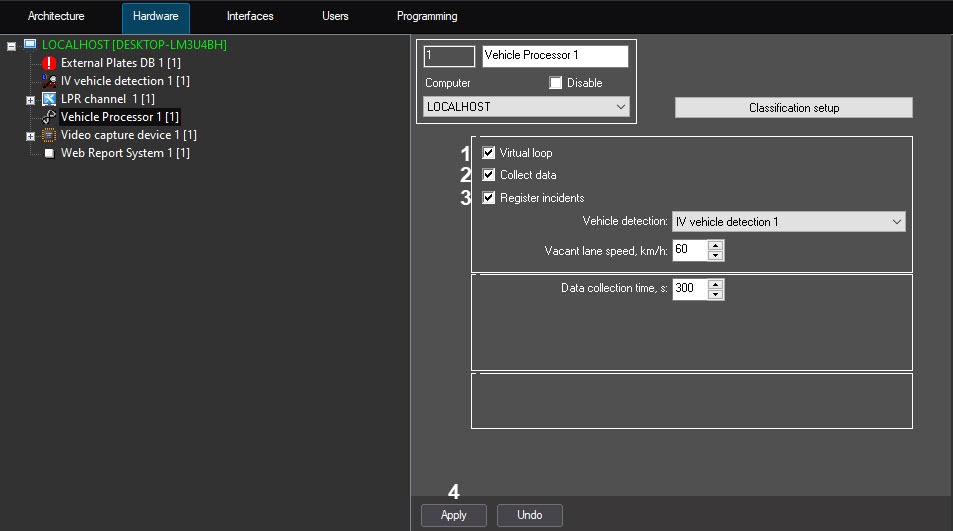
To enable the mode of imitating the virtual loop, set the Virtual loop (1) checkbox. The result of this mode operation is retranslating the events of vehicles passing in and out from the detection zone, registered by the IntelliVision vehicle detection IV vehicle detection module. By default, the events are retranslated without storing to the Vehicle processor database. To enable storing the events to the database, perform the step 3.
| Info | ||
|---|---|---|
| ||
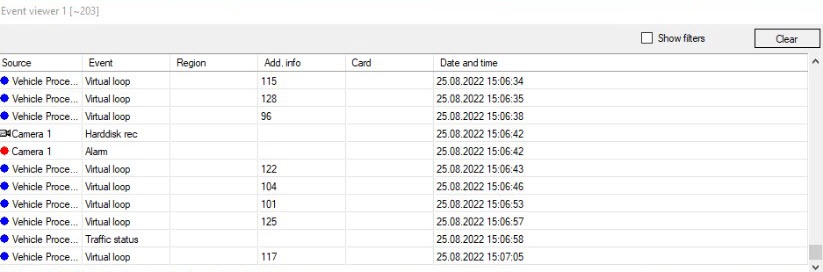
Vehicle speed will be displayed in the Add. info column of the Event viewer interface object if the Virtual loop checkbox is set. |
To enable the registration mode and storing the incidents in the traffic to the Vehicle Processor database, set the Register incidents (3) checkbox .
| Info | ||
|---|---|---|
| ||
At the moment of writing the documentation, only the Meeting of traffic incidents are registered. |
...

