
Go to documentation repository


Page History
...
To select a different shutdown option, do the following:
- Go to the Users tab in the System settings window.
- In the object tree that is below the User permissions rights button on the Users tab, select the same-name object that corresponds to the account of operator permissions rights that you want to change. As a result, the settings panel of the the User permissionsrights object is displayed in the right part of the System settings window on the Main tab.
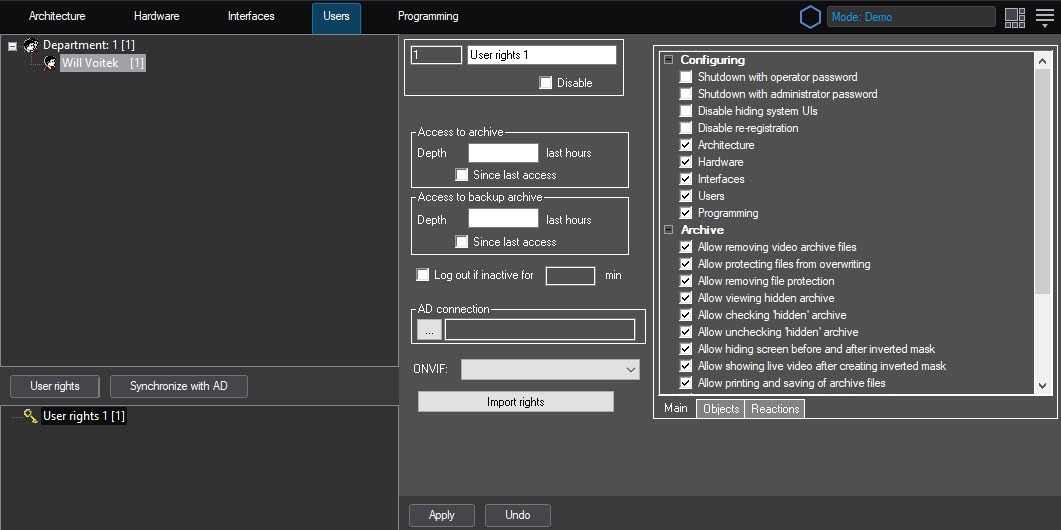
- Configure the shutdown of Axxon PSIM:
- Set the Shutdown with operator password checkbox to shut down the system with a password of this operator only.
- Set the Shutdown with administrator password checkbox to shut down the system with an administrator password only.
- Set the Shutdown with operator password and Shutdown with administrator password checkboxes to shut down the system with either a password of this operator or an administrator password.
- Set the Shutdown with administrator password and the Disable re-registration checkboxes to prohibit this operator from shutting down the system.
- Clear the Shutdown with operator password, Shutdown with administrator password, Disable re-registration checkboxes to shut down the system with a password of any registered operator. This option is used by default.
- Click the Apply button.
...
Overview
Content Tools