
Go to documentation repository


Page History
...
To manually install the Sentinel LDK Run-time environment, do the following:
- Download the the haspdinst_EOAWT.exe installer installer.
- Run the command line as a system administrator.
- Execute the haspdinst_EOAWT.exe -i -fi -fss command.
- Restart the Sentinel LDK License Manage service or restart the OS.
...
- Download the distribution package: 25 FPS or 6 FPS.
- Run the command line as a system administrator.
- Execute the SDK_4hi_60d_WORLD.exe -i -fi -fss command (for a 25 FPS demo license) or SDK_4lo_60d_WORLD.exe -i -fi -fss command (for a 6 FPS demo license).
- Restart the Sentinel LDK License Manage service or restart the OS.
...
To install a hardware key, do the following:
- Download and install the the HASPUserSetup.exe driver distribution package.
- Connect the hardware key to the server where you plan to use the License plate recognition VT. If the Sentinel LDK Run-time environment is successfully installed, the license is automatically recognized by Axxon One, and it is ready to use.
...
To install a software key, do the following:
- Download the RUS_EOAWT.exe.
- Run the command line as a system administrator.
- Execute the haspdinst_EOAWT.exe -fr -purge command.
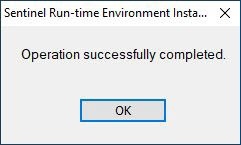
- Click the OK button in the window to confirm the installation is completed.
Run the RUS_EOAWT.exe file to start the Remote Update System. The RUS window opens.
Info title Note The abbreviation RUS stands for "Remote Update System".
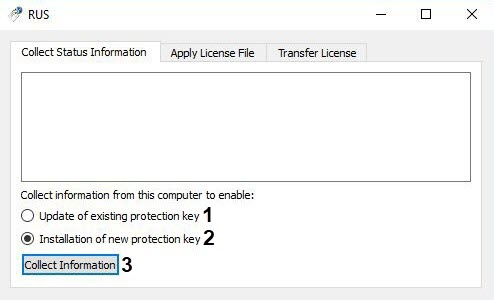
- Set the Collect information from this computer to enable switch into one of the following positions:
- Update of existing protection key (1) if a demo license is already in use.
- Installation of new protection key (2) if a license for a "clean computer" is required, that is, if there is no demo license on the server.
- Click the Collect Information button (3).
- Save the file with the c2v extension to the required directory.
- Close the RUS_EOAWT.exe utility.
Submit the created file with the c2v extension to the AxxonSoft manager.
Get a v2c file from the AxxonSoft manager.
- Run the RUS_EOAWT.exe utility and go to the Apply License File tab (4).
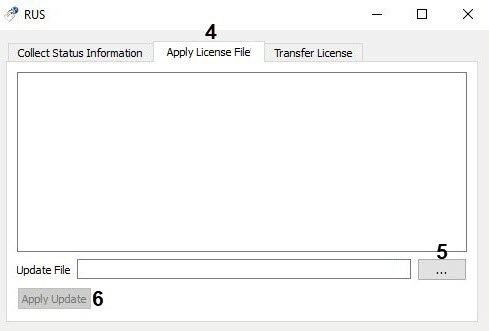
- Specify the location of the license file in the Update File field using the ... button (5).
- Click the Apply Update button (6).
- Restart the Sentinel LDK License Manage service or restart the OS.
...
Overview
Content Tools