
Go to documentation repository


Page History
...
General information about configuring Automatic connection
| Note | ||
|---|---|---|
| ||
To configure and use the Automatic connection feature, you need an active license key (see Types of licenses). |
This setting is used to automatically connect:
- the client to the server without having to re-enter the server name, username, and password when starting the app;
- the client to servers that belong to different domains (see Cross-System client);
- the client to the nodes of the FailOver failover system (see Configuring Failover VMS).
...
- ).
Configuration of
...
automatic connection
To configure automatic connection:
- Go to the Settings tab → the Options tab (1) → Automatic connection (2).
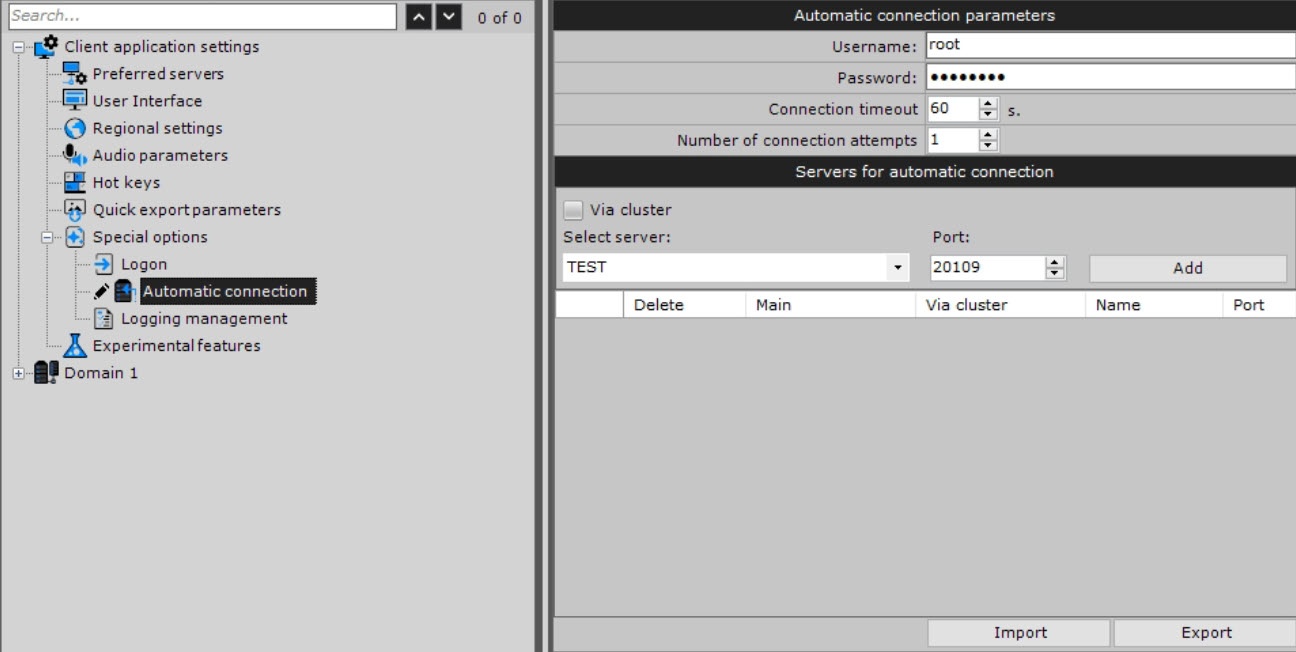 tab → Special options → Automatic connection.
 - Specify the required settings listed in the table:
Parameter Value Description Automatic connection parameters Username Enter the username and password for automatic authentication when connecting to the servers. If you leave these values blank, you must log in manually when you start the client
Note title Attention! The
cross Cross-
system System client connects to all servers using a single username-password pair that must be created in each domain (see Cross-System client).
Password Connection timeout The default value is 60 15 seconds. Specify the time in seconds to wait for a successful connection before considering the attempt unsuccessful. When you use this setting, an attempt to automatically connect is made immediately. If unsuccessful, the server waits for the user-specified timeout period and then retries to connect. The value must be in the range [5, 300] Number of connection attempts The default value is 1. Set the maximum number of attempts to automatically connect after the specified timeout. The value must be in the range [1, 100] Connection type Normal connection Provides connection to one server, while other servers serve as backups. If the main server is unavailable, connections to the backup servers are made sequentially. All servers must be in the same domain
Cross-system connection Provides simultaneous connections to several servers that belong to different domains. The main server connects first, followed by other servers (regardless of the availability of the main server). All servers must be in different domains
Servers for automatic connection Select server Select the server from the drop-down list or enter the IP address of a server Port The default value is 20109. Specify the port to connect to this server. If you leave the field blank, the connection is established via the standard port that is set by default - Click the Add
 button.
| Info | ||
|---|---|---|
| ||
|

Configuration of automatic connection of the client to servers is complete. The next time you start Axxon One, it connects to the selected servers.
Configuration of automatic connection of the client to servers that belong to different domains
When you use the Cross-System client, select the main domain after you add all servers to the list. To select the main domain, set the Main checkbox in the corresponding column of the server that is on the domain.
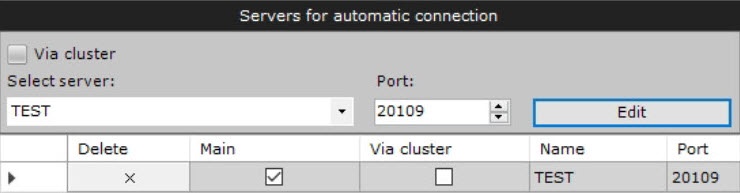
When connecting, the client will use the parameters (maps, layouts, user permissions) of the main domain.
Configuration of automatic connection of the client to the nodes of the
...
Failover system
If you want to configure automatic connection to a node of the FailOver failover system:
- Set the Discover Via cluster checkbox.
- In the Select server field, enter the IP address of any server of the cluster.
- Click the
 button.
 - From the drop-down list, select a node that you want to add to autoloading.
- Click the Add button.
- Click the Apply
 button. To cancel the actions, click the Cancel
  button.
Configuration of automatic connection of the client to the node of the FailOver Failover system is complete.
Configuration of automatic connection to the backup server
...
- In the Automatic connection parameters group, enter the IP address and port of the main server and the name of the node.
- Click the Add
 button.
 - Set the checkboxes in the Main and Discover cluster Via cluster columns.
- In the Preferred servers parameters group, select Select a backup server from the list or enter its IP address and node name.
- If necessary, change the default port for the backup server in the Port field.
- Click the Add button.
- Click the Apply button.
Configuration of automatic connection to the backup server is complete.
...
- From the Select server drop-down list, select the server.
- In the Port field, specify a new port.
- Click the Edit
 button.
Changing the port of the added server is complete.
...
To save the configuration of automatic connection to servers and preferred servers (see Preferred servers) to servers to a JSON file, click the Export button.
To load the configuration on the clients:
- Click the Import
 button.
 - Click the Apply button.
Loading of configuration is complete.
Overview
Content Tools