
Go to documentation repository
...
Set the Generate event on appearance/disappearance of the track checkbox to generate an event when an object (track) appears in the frame and disappears from the frame.
| Info | ||
|---|---|---|
| ||
The track appearance/disappearance events are generated only in the debug window (see Start the debug window). They aren't displayed in the Event event viewer. |
Set the Save tracks to show in archive checkbox to highlight the detected object with a frame when viewing the archive.
| Info | ||
|---|---|---|
| ||
This parameter doesn't affect the VMDA search and is used just for the visualization. For this parameter, the titles database is used. |
| Info | ||
|---|---|---|
| ||
|
| Info | ||
|---|---|---|
| ||
Neural networks are named taking into account the objects they detect. The names can include the size of the neural network (Nano, Medium, Large), which indicates the amount of consumed resources. The larger the neural network, the higher the accuracy of the object recognition but the greater the load on the CPU. |
 button to the right of the Tracking model field and specify its file in the standard Windows Explorer window that opens.
| Note | ||
|---|---|---|
| ||
To train the neural network, contact AxxonSoft technical support (see Data collection requirements for neural network training). The use of the trained neural network for a particular scene allows you to detect only objects of a certain type (for example, a person, a cyclist, a motorcyclist, and so on). |
| Note | ||
|---|---|---|
| ||
|
| Info | ||
|---|---|---|
| ||
The selection of only moving objects and only stationary objects isn't mutually exclusive, as some tracks cannot be determined as either moving or stationary. First, the neural network detects all objects, and after that, the detector filters out unnecessary tracks in accordance with the selected value of the Process setting. |
...
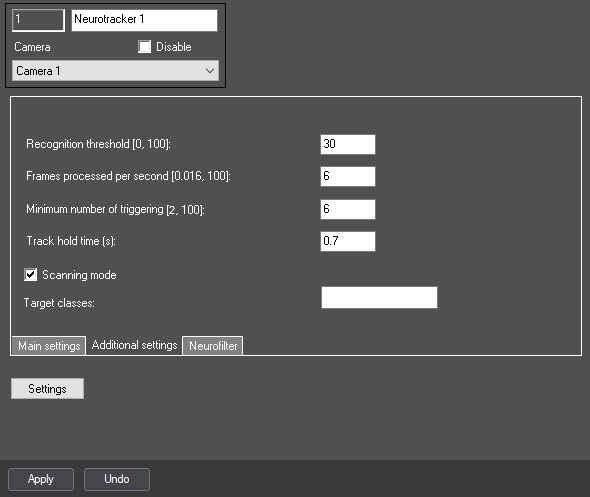
In the Recognition threshold [0,100] field, specify the neurocounter sensitivity—an integer number in the range from 0 to 100.
| Info | ||
|---|---|---|
| ||
The neurotracker sensitivity is determined experimentally. The lower the sensitivity, the higher the probability of false alarms. The higher the sensitivity, the lower the probability of false alarms, however, some useful tracks can be skipped (see Examples of configuring neural tracker for solving typical tasks). |
| Info | ||
|---|---|---|
| ||
The recommended value is at least 6 FPS. For fast moving objects (running person, vehicle)—at least 12 FPS (see Examples of configuring neural tracker for solving typical tasks). |
In the Track hold time (s) field, specify the time in seconds after which the object track is considered lost in the range from 0.3 to 1000. This parameter is useful in situations when one object in the frame temporarily overlaps another. For example, when a large vehicle completely overlaps a small one.
| Info | ||
|---|---|---|
| ||
If an object (track) is close to the frame boundary, then approximately half of the time specified in the Track hold time (s) field must elapse from the moment the object disappears from the frame until its track is deleted. |
| Info | ||
|---|---|---|
| ||
|
...

